.webp)




Terraform drift detection tools help enterprise teams avoid the chaos and expense of uncontrolled infrastructure changes. Your cloud resources can drift out of sync when someone makes changes outside the normal IaC workflow. Picture getting an alert the moment someone tweaks your security group settings manually instead of using Terraform… this isn't just wishful thinking, it's possible with the right tools.
Drift creates a big risk by causing environments to become inconsistent with each other. Teams need to spot and fix these differences to protect security, meet compliance rules, and keep operations running smoothly. Tools like Terraform Enterprise offer built-in checks that constantly monitor infrastructure state and send alerts when changes happen. Setting up drift detection is straightforward—you just need to enable health assessments in your workspace. The landscape is changing though. IBM’s acquisition of HashiCorp has led many enterprises to hedge against vendor lock-in and seek more flexible alternatives.
We tested the best terraform drift detection tools that enterprise teams use in 2026. Our comparison looks at features, limits, and ground performance of each option. This piece covers everything from Terraform Enterprise to open-source options and cloud-native solutions to help you pick a tool that keeps infrastructure in sync and security teams content.
Terraform Enterprise
Terraform Enterprise stands out as IBM HashiCorp's premium self-managed solution. Organizations with strict security and compliance needs will find its latest releases packed with powerful features that boost infrastructure management.
Terraform Enterprise key features
Terraform Enterprise offers these reliable features to manage infrastructure at scale:
- Advanced drift detection runs continuous checks against infrastructure state to spot changes made outside Terraform workflows and sends customizable alerts to operators
- Projects functionality helps teams organize related workspaces within organizations. This creates logical ownership boundaries and lets teams manage themselves with project-level permissions
- Enhanced security options like GitHub App authentication improve security by operating under its own identity while applying individual user permissions
- Dual policy framework support through HashiCorp Sentinel and Open Policy Agent (OPA) lets teams pick their preferred framework
- Dynamic provider credentials make use of OpenID Connect (OIDC) to generate short-lived cloud credentials. This eliminates risks tied to static credentials
Teams can now share providers in private registries across organizations. This substantially cuts down the manual work needed to publish providers in each organization.
Terraform Enterprise pros and cons
Pros:
- You control the deployment environment and data
- Projects feature and workspace organization make management easier
- Premium support comes with all packages
- Works smoothly with existing HashiCorp products
- Health assessments feature makes drift detection setup simple
Cons:
- Base package costs much more than cloud alternatives
- Base package limits you to five workspaces
- You need internal experts to maintain the self-hosted setup
- Updates come less often than SaaS versions
Terraform Enterprise pricing
Terraform Enterprise uses a premium pricing model starting at $15,000 per year based on marketplace listings. The base package includes just five workspaces. Unlike Terraform Cloud's tiered plans, Enterprise targets large organizations that need self-hosting and includes premium support by default.
Your organization should contact HashiCorp directly to get a custom quote. Prices change based on workspace numbers and extra features you need.
Terraform Enterprise best for
These organizations will benefit most from Terraform Enterprise:
- Teams in highly-regulated industries that must keep data within their control
- Enterprise groups that want full control over their infrastructure management platform
- Companies using other HashiCorp products who want everything to work together
- Teams that need advanced governance features like custom policy frameworks
The platform works best when security matters more than convenience. Small organizations might find better value elsewhere due to the high price tag. Teams that need detailed drift detection and strong governance controls will find Terraform Enterprise a complete solution, despite its premium cost.
env zero
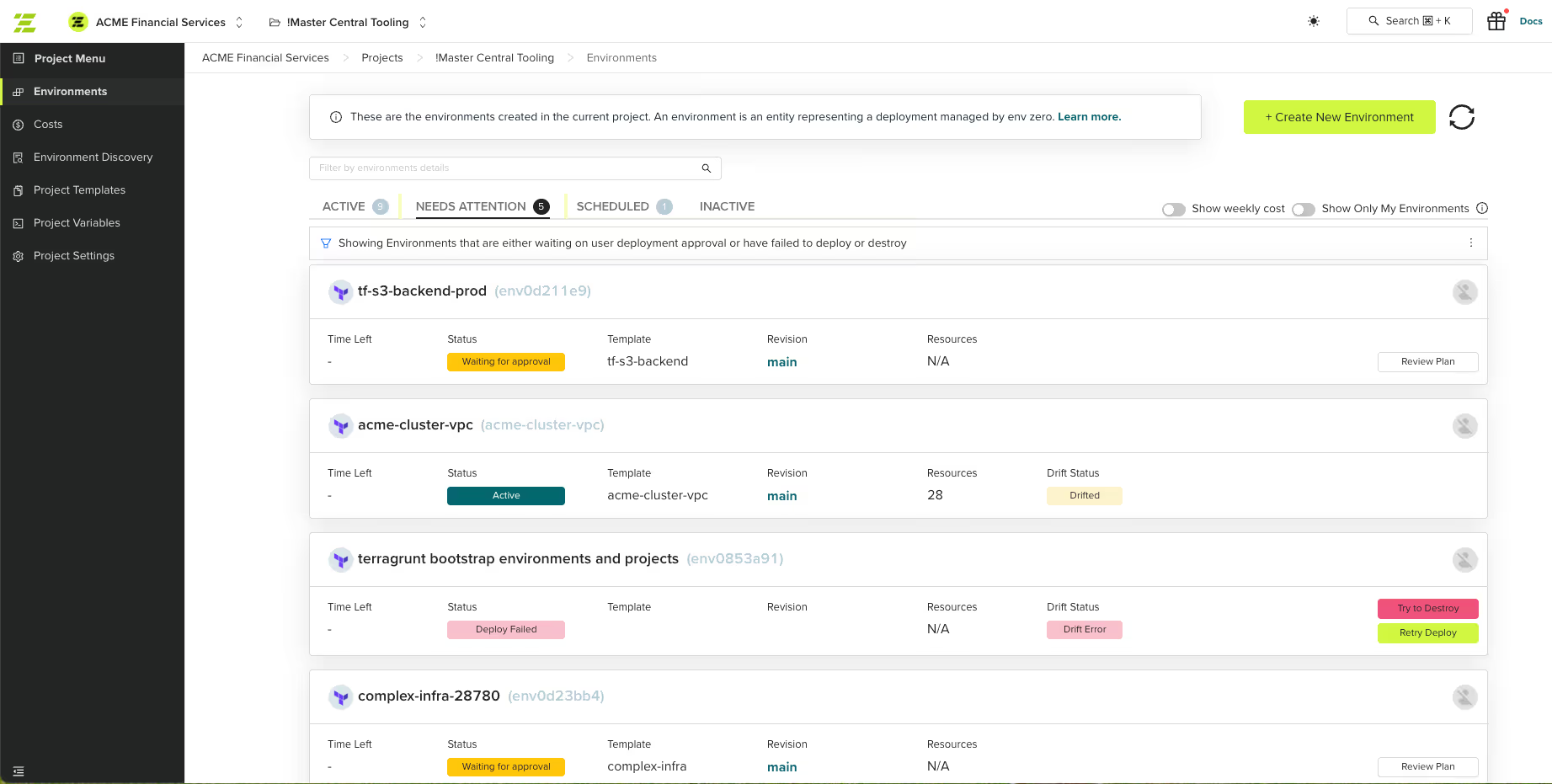
Image Source: env zero
env zero stands out as a complete platform that connects drift detection with automated remediation. Teams can line up their Infrastructure as Code with cloud resources through practical automation while retaining control.
env zero key features
env zero comes with a reliable suite of drift management capabilities:
- Instant drift detection that identifies and analyzes configuration drift within minutes, even before full onboarding
- AI-powered drift analysis through Cloud Compass that assesses drift likelihood and identifies risk based on past events up to 12 months
- Drift cause identification shows who made changes, how they occurred, and when, with severity classification
- Smart auto remediation gives multiple options to handle detected drift:
- Sync cloud to match code (redeploy current configuration)
- Sync code to match cloud (update codebase via pull request)
- Policy-based conditional remediation
- Complete monitoring with VCS-integrated continuous checks and centralized reporting
env zero pros and cons
Pros:
- Supports all IaC frameworks—not just Terraform—to help teams mitigate lock-in
- Shows full drift visibility across past, present, and future states
- Supports both automated and policy-driven remediation workflows
- Works with version control systems for traceability
- Uses AI-assisted logic for drift analysis and remediation
- Matches automation speed with governance needs
Cons:
- Automated scanning has natural limits when finding unmanaged cloud resources
- Requires full sharing of state files in order to get most comprehensive drift detection and remediation
- Very enterprise-oriented, so less suitable for smaller teams with few cloud resources
env zero pricing
env zero has three packages that fit different organization's needs:
- Cloud Compass: Starts at $1,500/month for unlimited cloud resources
- Cloud Navigator: Mid-tier option priced per apply or environment with simple drift management features
- Cloud Pilot: Premium package includes advanced drift cause analysis, remediation, monitoring, and AI-powered insights
Each package includes unlimited users and concurrent runs. The price difference mainly comes from the depth of drift management and other features.
env zero best for
env zero works great for:
- Organizations that need to balance automation with governance controls
- Teams wanting detection and automated remediation in one platform
- Multi-cloud environments needing drift management for infrastructure of all types
- Enterprises valuing policy-based automation and approval workflows
- Teams using multiple IaC tools (Terraform, Pulumi, CloudFormation)
env zero shines in environments where teams need speed without losing control. Ready to see env zero in action? Request a technical demo today to find how it can streamline your infrastructure management. The platform's mix of visibility and remediation capabilities makes it ideal for organizations handling complex multi-cloud deployments that need continuous monitoring.
Terraform Cloud (HCP Terraform)
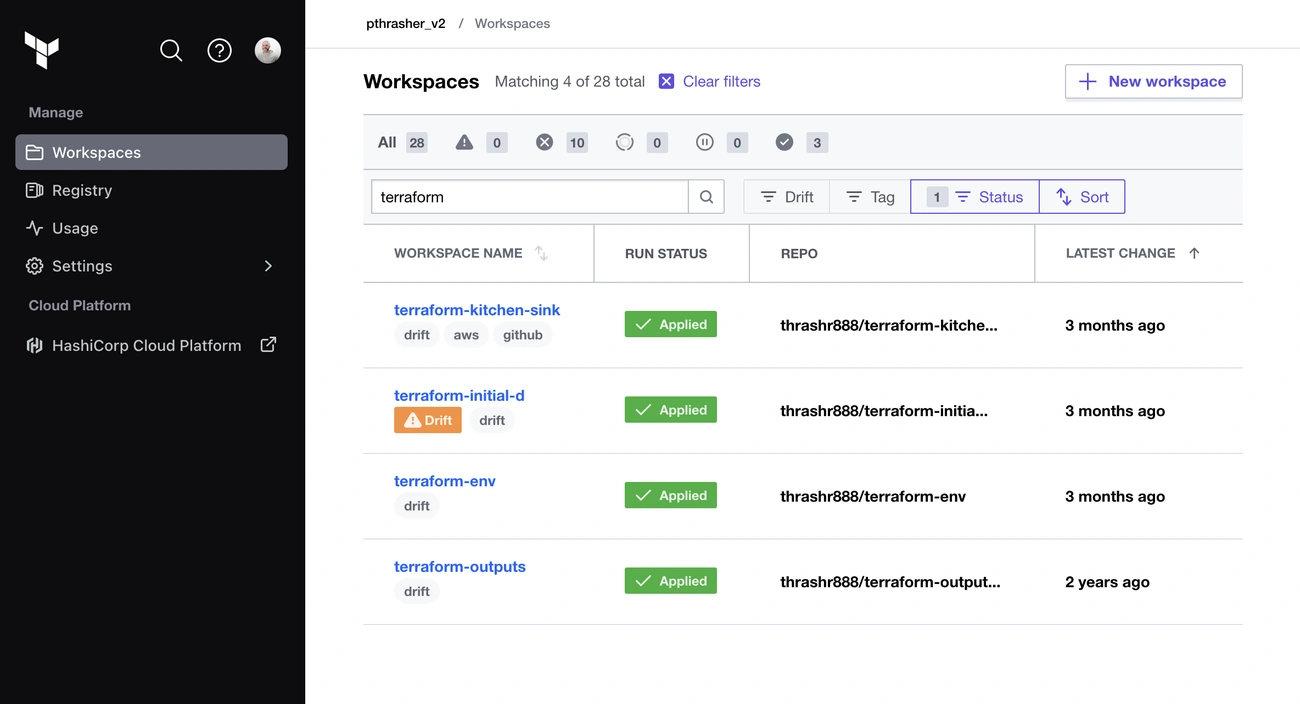
Image Source: HashiCorp
HCP Terraform is IBM HashiCorp’s SaaS-based solution that helps manage infrastructure and comes with powerful drift detection features. Teams looking for simple infrastructure management can skip self-hosting and get enterprise-grade features right away.
Terraform Cloud key features
HCP Terraform provides several key capabilities to detect and manage infrastructure drift:
- Continuous drift detection runs automatic health checks on infrastructure every 24 hours after each successful run
- Proactive monitoring syncs resource states through background refresh operations that connect to cloud provider APIs
- Dedicated drift visualization displays specific attribute changes in a specialized dashboard tab
- Customizable notifications alert you through email, Slack, or webhooks when drift occurs
- Flexible remediation options let operators accept changes with a refresh-only plan or go back to the desired state
The platform includes remote state management and integrates with GitHub/GitLab/Bitbucket. Teams can organize workspaces and enforce policies using both Sentinel and OPA frameworks.
Terraform Cloud pros and cons
Pros:
- No infrastructure maintenance needed unlike self-hosted options
- Secure remote state storage works reliably across environments
- Background checks run automatically without manual work
- Code changes in popular version control systems trigger immediate runs
- Role-based access control lets you set detailed permissions
Cons:
- Workspaces with over 5,000 resources see slower performance
- Limited concurrent runs create bottlenecks (one for Free tier, three for Standard tier)
- New BSL license replacing MPL 2.0 raises open-source status questions
- OpenTofu/Terragrunt frameworks lack support
- Moving away from remote state becomes difficult due to lock-in
Terraform Cloud pricing
HCP Terraform bases its pricing on Resources Under Management (RUM) with four tiers:
- Free: Manage up to 500 resources with unlimited users and one concurrent run
- Essentials: Costs start at $0.10 per resource monthly
- Standard: Begins at $0.47 per resource monthly and includes audit logs and drift detection
- Premium: Starts at $0.99 per resource monthly with private environment features
The costs grow with infrastructure size instead of user count, which might get expensive for large setups.
Terraform Cloud best for
HCP Terraform serves these needs perfectly:
- Companies committed to the IBM ecosystem that want zero infrastructure maintenance
- Teams needing a central view of cloud resources
- Businesses that need constant drift monitoring without extra tools
- Small to mid-sized teams staying within 500-resource free limit
- Companies fine with infrastructure-based subscription pricing
The platform shines when teams already use IBM HashiCorp products and need drift detection without managing Terraform Enterprise. Companies should review pricing carefully if they have strict security needs or manage many resources.
Terraform Plan
Native Terraform command-line functionality provides a simple way to detect infrastructure drift. The terraform plan command helps you identify differences between configuration files and deployed resources.
Terraform Plan key features
The terraform plan command comes with several capabilities that help detect drift:
- State file management keeps track of the ground infrastructure that Terraform manages
- Automatic refresh updates state with current infrastructure before plan and apply commands
- Detailed change detection shows exactly what Terraform will change by resolving desired configuration with ground state
- Fine-grained control lets you manage specific drift scenarios through lifecycle parameters like prevent_destroy and ignore_changes
Teams can spot unauthorized or unplanned infrastructure changes without needing extra tools or services.
Terraform Plan pros and cons
Pros:
- No extra cost beyond standard Terraform installation
- Teams already using Terraform find it familiar
- Works the same way in all environments
- Needs no external tools or integrations
- You can access state information directly
Cons:
- Someone must run it manually since there are no scheduled checks
- Cannot send notifications about detected changes
- Lacks visual tools and its coverage features
- Cannot spot changes between plan runs
- Developers must review and interpret results
Terraform Plan pricing
The plan command comes free with open-source Terraform. Teams with limited budgets or those new to drift detection find it economical. Its free nature makes it a good match for paid services that add more features.
Terraform Plan best for
The native Terraform Plan works well for:
- Small teams with simple infrastructure
- Organizations watching their budget
- Environments that don't change often
- Projects that can handle manual checks
- Teams starting their infrastructure automation trip
This approach delivers the best results when teams run plans regularly and follow good change management practices. Organizations needing continuous monitoring or automated fixes should look at specialized platforms that offer more than this simple but reliable foundation.
Atlantis
Image Source: Medium
Atlantis is a pull request-driven approach to infrastructure management that creates a collaborative workflow for teams who want to prevent drift through code review processes. Many organizations now use this open-source, self-hosted tool as part of their Terraform management strategies.
Atlantis key features
Atlantis improves Terraform workflows through version control with these capabilities:
- Automated plan execution that runs terraform plan automatically whenever a pull request is opened or updated, posting results directly as PR comments
- Pull request-based operations letting team members trigger Terraform applies through simple comments after code review
- VCS integration that combines smoothly with GitHub, GitLab, Bitbucket, and Azure DevOps without needing a separate UI
- Detailed audit logs within pull requests that document all infrastructure changes
- Cloud-native identity support through self-hosted runners that can use native cloud provider identities (like AWS instance profiles)
Atlantis also supports Terraform wrappers like Terragrunt and works well with other Terraform helper tools such as tfsec, checkov, and Infracost.
Atlantis pros and cons
Pros:
- GitOps-focused workflow that promotes collaboration and code review
- Developers can execute infrastructure changes without credentials
- Complete audit trail of all changes within version control
- Open-source flexibility with active community development
- Natural integration with existing VCS workflows
Cons:
- Single-threaded execution creates bottlenecks in busy environments
- Limited high-availability support without built-in scaling capabilities
- Simple UI with minimal dashboards or reporting features
- Lacks native drift detection capabilities
- Much operational overhead for maintenance and configuration
Atlantis pricing
Atlantis comes free of cost as an open-source solution. Organizations only need to think about infrastructure expenses for self-hosting the service, typically through virtual machines, Kubernetes, or container services like AWS Fargate.
Atlantis best for
Atlantis works best for:
- Teams committed to GitOps workflows for infrastructure management
- Organizations that want to enforce pull request reviews for all infrastructure changes
- Small to medium-sized operations with moderate Terraform usage
- Teams looking to prevent drift at the source through review processes
- Organizations preferring self-hosted solutions with complete control over their tooling
Teams often pair Atlantis with dedicated detection tools to prevent drift through collaborative review rather than detecting it after the fact. This combination creates a more complete infrastructure governance solution.
driftctl
Image Source: GitHub
Snyk created driftctl as an open-source CLI tool to measure infrastructure as code coverage. The tool tracks differences between actual cloud resources and terraform states. This command-line utility helps find blind spots where unauthorized changes might create security risks.
driftctl key features
Driftctl offers focused tools to identify infrastructure changes:
- Complete drift detection finds managed resources with drifted attributes and unmanaged resources
- Coverage measurement shows how well your IaC codebase matches your cloud setup
- Multi-provider support works with AWS, GitHub, Azure, and GCP infrastructures
- Detailed diff generation helps you understand the nature and scope of detected drift
- Multiple state file scanning examines terraform state backends of all types
- Customizable filtering lets teams skip specific resources or attributes
driftctl pros and cons
Pros:
- Finds drifted attributes on managed resources with the --deep scanning mode
- Spots unmanaged resources through standard scan commands
- Works with multiple state files at once for better coverage
- Creates detailed reports of differences
- Combines smoothly with CI/CD pipelines for automated checks
Cons:
- Stays in maintenance mode with few new contribution reviews
- Takes longer to scan in --deep mode for large infrastructures
- API throttling can cause issues during big scans
- Doesn't support all Terraform resources
- Has limits with multiple aliased providers in one state
driftctl pricing
Driftctl comes free as an open-source tool without license costs. Teams only need to plan for the costs of adding it to their workflows and CI/CD pipelines.
driftctl best for
Driftctl works best for:
- Teams that want to see changes made outside Terraform's control
- Organizations that need constant monitoring through CI/CD integration
- Systems that must follow security policies through regular drift checks
- DevOps teams that want to check infrastructure automatically before deployment
- Organizations with smaller infrastructures where API throttling causes fewer issues
Even in maintenance mode, driftctl remains useful for teams that want to improve their infrastructure security. It helps through systematic drift detection, particularly when used before terraform actions in CI/CD pipelines.
cloud-concierge
Cloud-concierge takes an open-source approach to drift detection and delivers results through pull requests that combine smoothly with existing GitOps workflows. This self-hosted container solution enhances Terraform management with enterprise-level features at no extra cost.
cloud-concierge key features
Cloud-concierge provides powerful capabilities to manage infrastructure:
- Cloud codification that identifies unmanaged resources and generates corresponding Terraform code with import statements/blocks
- Drift detection to spot changes made outside your Terraform workflow
- Account flagging that shows which accounts create unauthorized cloud changes
- Cost estimation for your entire cloud environment through native Infracost integration
- Security scanning for your cloud infrastructure via integrated tfsec
The tool presents all results as a digestible Pull Request to your chosen repository and provides a "State of Cloud" report that maintains your GitOps workflow. You can run the container locally, in CI/CD pipelines, or anywhere that supports containers.
cloud-concierge pros and cons
Pros:
- Open-source project under Apache 2.0 license runs without usage tracking
- Strong security with self-hosted runners and anonymized cloud posture data
- Support for AWS, GCP, and Azure infrastructures
- Developers stay in familiar territory with results in version control systems
- Local setup takes just five minutes with minimal configuration
Cons:
- Managed offering shows fewer assets visually than alternatives
- Managed offering takes longer to onboard (15 minutes vs 5 minutes)
- Terraform remains the only supported IaC tool
- No integration with third-party SaaS tools for codification
cloud-concierge pricing
The creators designed cloud-concierge to provide enterprise-level features without any cost. The core container stays free to use as an open-source solution. Organizations that need extra features can access the managed platform at about one-tenth the cost of alternatives like ControlMonkey and Firefly, while getting similar features.
cloud-concierge best for
Cloud-concierge works great for:
- Organizations that want enterprise-style features without enterprise-level pricing
- Teams looking to keep their existing GitOps workflows without external tools
- Multi-cloud environments that need unified drift detection across AWS, Azure, and GCP
- Security-conscious teams who prefer self-hosted solutions with anonymized data sharing
- Organizations switching from DriftCTL to a tool that also codifies unmanaged resources automatically
Overmind
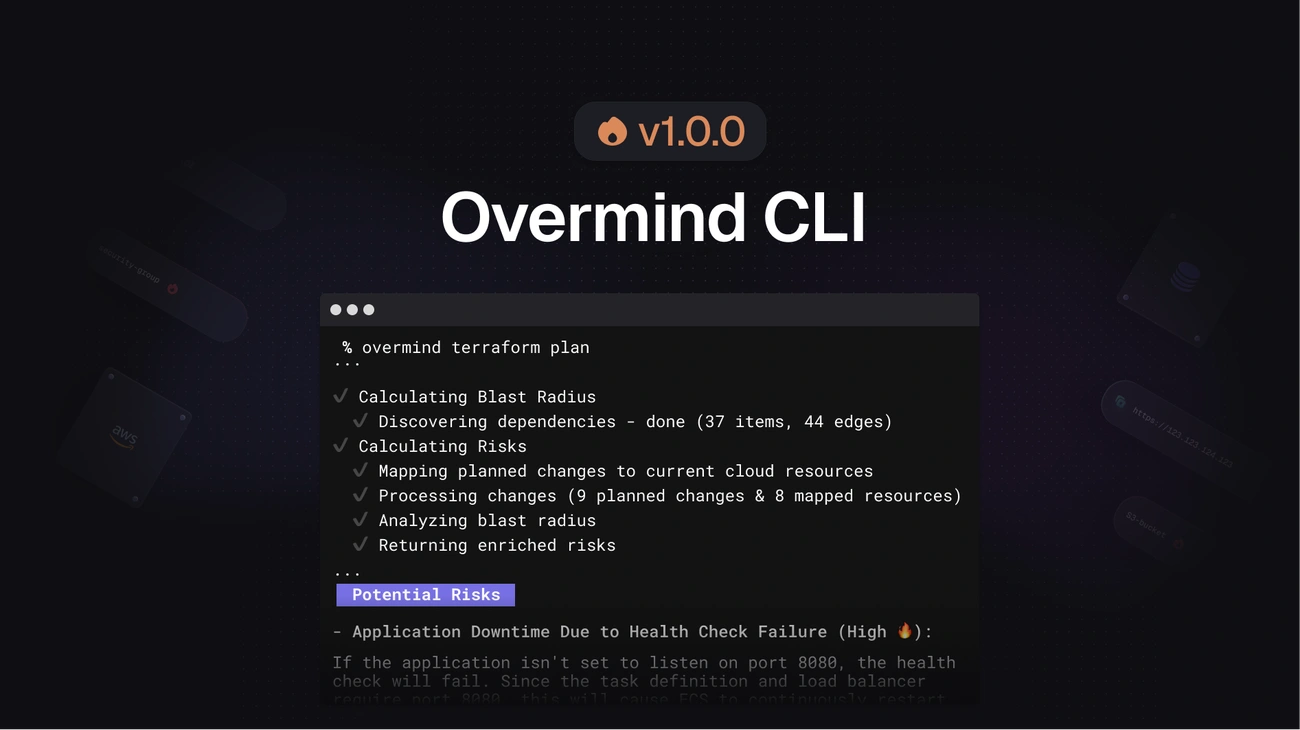
Image Source: Overmind
Overmind brings a fresh approach to terraform drift detection. It analyzes how changes affect your system instead of just spotting differences. The tool creates an immediate picture of your infrastructure. This includes everything beyond Terraform code, like resources you made through the console, CloudFormation, or other methods.
Overmind key features
The tool gives you smart infrastructure insights through:
- Real-time dependency mapping in multiple AWS accounts and regions, whatever way you created the resources
- Blast radius analysis that shows which dependencies your terraform changes might affect
- LLM-powered risk assessment that adds clear, applicable information right to your pull requests
- CI/CD integration works with read-only access and needs no extra permissions
- Rapid setup takes just 3 minutes to configure
Overmind pros and cons
Pros:
- Shows what changes will affect, not just what will change
- Works with resources you created outside Terraform
- Needs only read-only access to infrastructure
- Gives easy-to-read risk assessments
- Helps new team members understand infrastructure better
Cons:
- We focused mainly on AWS resources and Kubernetes
- Supports just over 100 AWS resource types now
- Some might find the pricing model complex as it's based on prevented downtime
- Tool is new to the ecosystem with features still in development
Overmind pricing
You can choose between two pricing tiers:
- Free tier: Use all features unlimited for one repository
- Enterprise plan: Cost based on prevented downtime, calculated as part of your yearly downtime cost
The enterprise pricing uses this formula that matches your business value: Your Annual Revenue ÷ 525,600 minutes = Revenue per minute.
Overmind best for
Overmind works great for:
- Teams that manage infrastructure through different methods
- Companies that need to see how services depend on each other
- Teams where members have different infrastructure knowledge levels
- Places where deployment timing can affect app availability
- Companies wanting less reliance on "tribal knowledge" for safe deployments
Conclusion
Terraform drift detection tools protect organizations from unmanaged infrastructure changes. Eight powerful solutions show different ways to tackle the drift detection challenge. Terraform Enterprise offers premium governance features at higher price points. The sort of thing I love about env zero is its AI-powered drift analysis and automated fixes. HCP Terraform gives organizations a balanced SaaS approach with zero maintenance needs.
Teams with budget constraints can turn to open-source options like cloud-concierge and driftctl. These tools need more hands-on work but deliver great value.
Your choice should depend on your organization's size, security needs, and current tools. Small teams often find Terraform Plan works well for simple detection. Large companies running complex multi-cloud setups need dedicated platforms with constant monitoring and fix workflows. Want to see how env zero can help manage your Terraform setup? Book a technical demo to check out its features.
Security stays crucial whatever tool you pick. Knowing how to spot unauthorized changes quickly, understand their effects, and fix them properly prevents expensive compliance issues and security problems. Some tools go beyond simple detection. Overmind's dependency mapping and env zero's AI analysis provide extra context about detected drift.
A reliable drift detection system needs the right tools and proper practices. Regular checks, clear policies, and automated workflows help keep infrastructure secure across cloud environments. These tools will become even more vital as infrastructure grows more complex in 2026 and beyond. Enterprise teams that want operational excellence can't ignore them.
Key Takeaways
Enterprise teams in 2026 need robust drift detection tools to prevent costly infrastructure chaos and maintain security compliance across their cloud environments.
• Terraform Enterprise leads for regulated industries - Offers comprehensive drift detection with governance features, but requires $15,000+ annual investment and internal expertise.
• env zero delivers AI-powered automation - Provides instant drift detection with automated remediation and cause analysis, ideal for teams balancing speed with control.
• Open-source options like driftctl and cloud-concierge - Offer enterprise-level features without licensing costs, perfect for budget-conscious teams willing to manage tooling.
• Native Terraform Plan remains foundational - Free built-in detection works for small teams, but lacks automation and notification capabilities required at scale.
• Choose based on team size and complexity - Small teams can start with basic tools, while large enterprises need dedicated platforms with continuous monitoring and multi-cloud support.
The key to successful drift management lies not just in selecting the right tool, but in establishing proper operational practices with regular monitoring, clear governance policies, and automated workflows to maintain infrastructure integrity and prevent security breaches.
FAQs
What is Environment Drift in Infrastructure Automation?
Environment drift occurs when the configuration of an environment (development, testing, or production) changes unintentionally, causing inconsistencies across environments. These changes often happen when someone manually updates settings outside the regular Infrastructure as Code (IaC) workflow. Drift can cause errors, deployment failures, and security vulnerabilities, which is why detecting and correcting drift is critical for maintaining stable, reliable environments.
Why is Drift Detection Important for Enterprise Teams?
Drift detection is crucial for ensuring consistent, reliable infrastructure across all environments. Without it, organizations risk misalignments between environments, which can lead to failed deployments, system outages, and security issues. Tools like Terraform Enterprise and ENV Zero provide continuous drift detection, ensuring that all resources remain aligned with the desired state defined by IaC, preventing unauthorized changes and ensuring compliance.
How Does ENV Zero Detect and Correct Drift?
ENV Zero uses AI-powered drift analysis and continuous monitoring to detect discrepancies between your infrastructure's current state and the defined configuration. The platform provides real-time alerts when drift is detected and offers multiple automated remediation options, such as syncing cloud resources to match the code or updating the codebase via a pull request. This combination of detection and remediation helps maintain stability and reduce risks associated with drift.
What Are the Benefits of Automated Drift Remediation?
Automated drift remediation offers several benefits:
- Faster recovery from issues by automatically restoring alignment between environments.
- Minimized manual intervention, freeing up your team to focus on high-value tasks.
- Enhanced security and compliance, ensuring that your infrastructure remains up-to-date with security standards.
- Improved operational efficiency, reducing downtime and deployment failures by addressing drift proactively.
How Does Terraform Enterprise Help with Drift Detection?
Terraform Enterprise offers advanced drift detection capabilities, including continuous health checks on infrastructure to spot changes outside the Terraform workflow. It sends customizable alerts when drift occurs and allows teams to choose from several remediation strategies, such as syncing cloud resources or reverting to the desired configuration. With Terraform Enterprise, enterprises can manage complex infrastructures with enhanced security and compliance features.
Can Open-Source Drift Detection Tools Be Used for Enterprises?
Yes, open-source tools like driftctl and cloud-concierge offer strong drift detection capabilities, making them suitable for smaller teams or enterprises with budget constraints. While they may require more manual effort and lack some advanced features found in enterprise-level solutions, they provide valuable drift detection and remediation tools for IaC frameworks like Terraform, Pulumi, and CloudFormation. These tools are ideal for teams needing continuous monitoring without the high cost of premium solutions.
Related: env0’s AWS integration brings environment management, cost controls, and deployment guardrails to your AWS infrastructure workflows.
Further reading: Addressing the Problem of Drift Detection and Drift Cause Analysis — a deep dive into how drift manifests and how to identify its root cause.