.avif)

.webp)



Related reading: Still deciding which platform to migrate to? Terraform Alternatives: A 2026 Buyer's Guide compares env zero, Spacelift, Scalr, and the IaC tool alternatives side by side.
Migrating from Terraform Cloud (TFC), now known as HCP Terraform, or Terraform Enterprise (TFE) can quickly become complex. Workspaces, variables, remote state, and project structure all need to be recreated carefully to avoid breaking infrastructure workflows.
env zero’s new migration wizard dramatically simplifies that process, enabling teams to migrate from TFC to env zero within a matter of hours.
Instead of manually rebuilding your Terraform Cloud setup, the wizard scans your organization, discovers existing workspaces, and recreates them as environments in env zero. Variables and state are transferred automatically, and the migration concludes with a controlled cutover when you are ready.
For example, a platform team managing 150 Terraform Cloud workspaces across 12 projects can connect their Terraform Cloud organization, scan existing workspaces, review the discovered environments, and begin migrating selected workspaces in minutes.
Why Terraform Cloud migration is difficult
Organizations using Terraform Cloud typically manage many workspaces connected to repositories, environment variables, and backend state. Recreating this setup in another platform requires several careful steps:
- Rebuilding workspace structure without breaking existing environment organization
- Migrating variables and secrets without exposing sensitive values or losing configuration
- Transferring Terraform state without corrupting it or triggering unintended resource recreation
- Preserving project hierarchy so infrastructure environments remain organized and traceable
- Preventing deployment conflicts during migration while Terraform Cloud and the new platform may both attempt to run deployments
When done manually, this process is time consuming and error prone.
The env zero migration wizard addresses these challenges by automating the discovery and recreation of Terraform Cloud workspaces.
Automatically discover Terraform Cloud workspaces
The first step in migrating Terraform Cloud is identifying everything that needs to move.
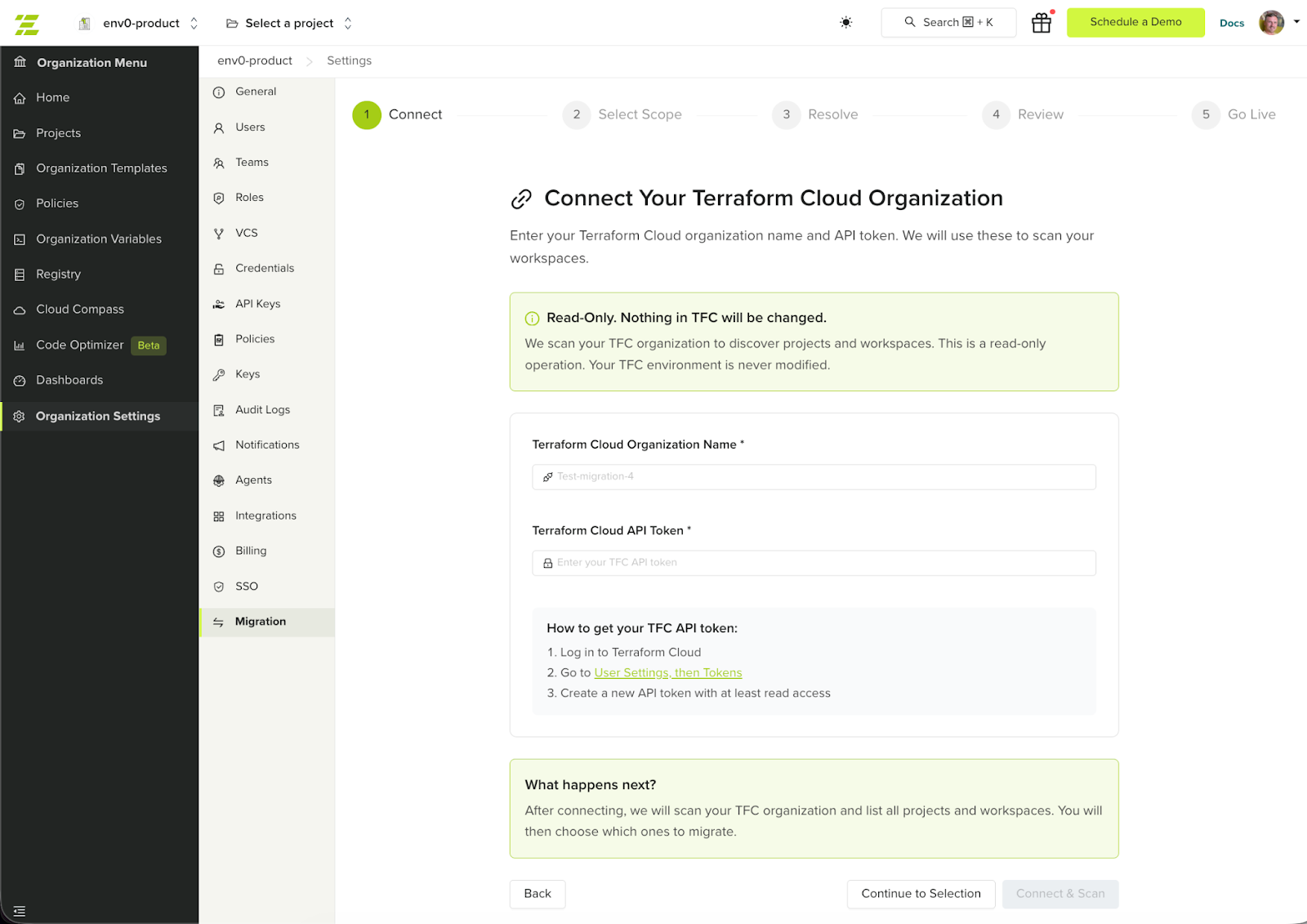
The migration wizard connects to your Terraform Cloud organization using an API token and scans for:
- Terraform Cloud workspaces
- Workspace variables
- Variable sets
- VCS configuration
- Terraform state
env zero then prepares the corresponding environments so the existing infrastructure setup can be recreated without rebuilding it manually.
For the full comparison of env zero and HCP Terraform — including pricing, governance, and the manual migration CLI sequence — see The Best Terraform Cloud Alternative in 2026.
Mapping Terraform Cloud to env zero
The wizard translates Terraform Cloud concepts directly into env zero environments. For example, Terraform Cloud workspaces become env zero environments, variable sets become configuration sets, and workspace variables are migrated to environment variables. The existing project hierarchy is preserved so infrastructure environments remain organized after the migration.
A guided Terraform Cloud migration process
The migration wizard walks through a structured workflow designed to minimize risk.
Connect and scan
After providing a Terraform Cloud API token, env zero scans the organization and discovers available workspaces and their configuration.
Resolve configuration gaps
If required information is missing, such as secrets or repository access, the wizard highlights the gaps so they can be resolved before migration.
Review and migrate
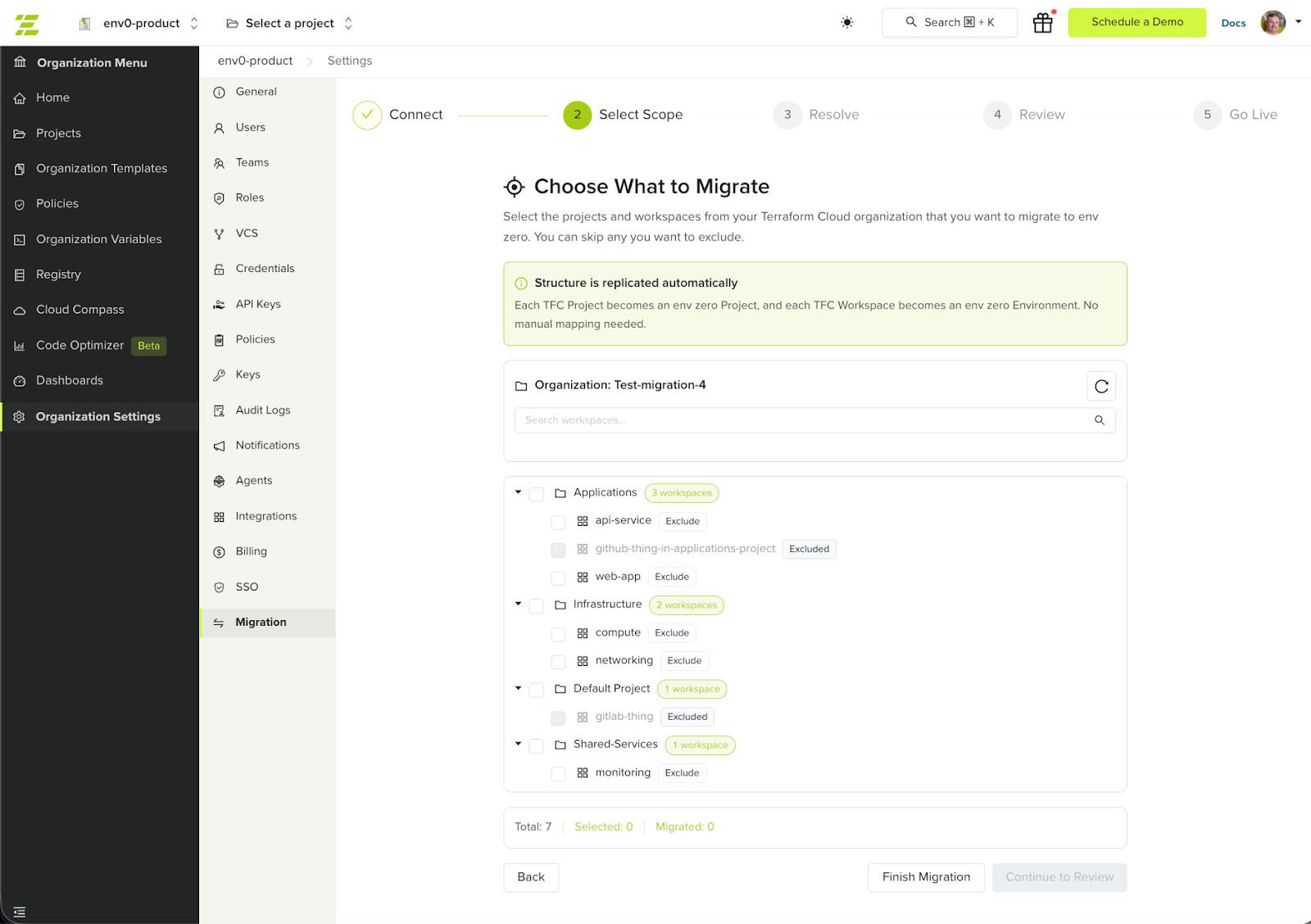
Teams can review the discovered workspaces and select which ones to migrate. The wizard recreates environments in env zero while preserving the project structure.
After the Terraform state is imported, env zero runs a drift detection plan to verify that the imported state matches the actual infrastructure and that no unexpected changes are detected before migration continues.
Go live
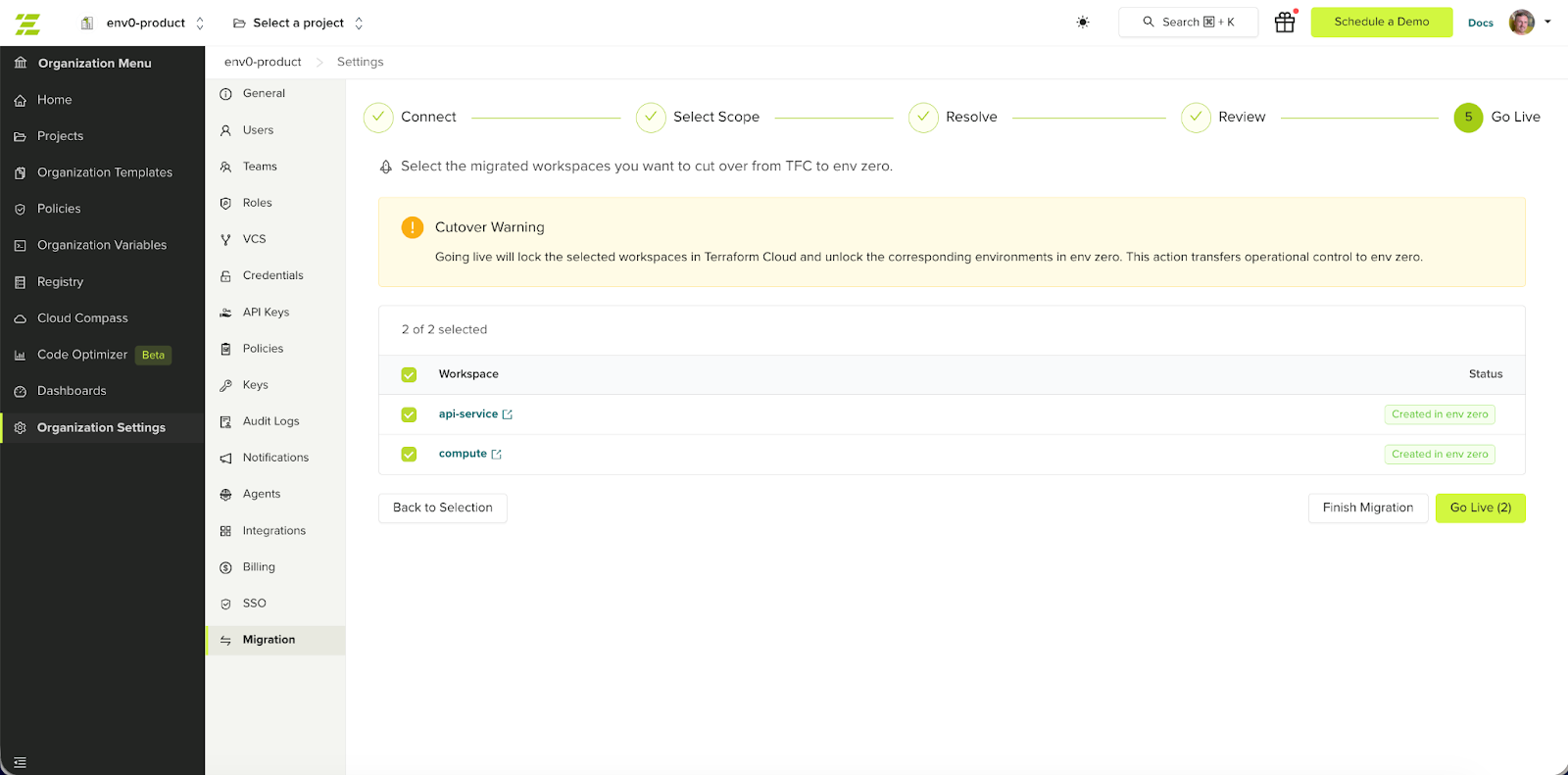
When everything is ready, the final step completes the migration.
Terraform Cloud workspaces are locked to prevent additional runs, and the corresponding environments in env zero are activated. This ensures a controlled cutover without conflicting infrastructure deployments.
Migrate Terraform Cloud environments gradually
Large organizations often manage dozens or hundreds of Terraform Cloud workspaces.
Instead of migrating everything at once, the migration wizard allows teams to move environments gradually.
Teams can:
- migrate a small set of workspaces first
- validate deployments in env zero
- continue migrating additional workspaces later
Migration sessions are preserved, allowing teams to return and continue the process at any time.
This staged migration approach significantly reduces risk when moving infrastructure management platforms.
What gets migrated automatically
The wizard recreates the core Terraform Cloud configuration required to run infrastructure in env zero.
This includes:
- Terraform Cloud workspaces recreated as environments
- Workspace variables migrated to environment variables
- Variable sets migrated to configuration sets
- Project hierarchy preserved
- Terraform state transferred to the env zero remote backend
Terraform Cloud workspaces remain operational until the go-live step is completed.
What is not migrated automatically
Some Terraform Cloud components depend on organization specific workflows and should be configured manually after migration.
These include:
- Private module registry: modules should be republished in the env zero module registry or referenced from their existing source.
- Sentinel or OPA policies: policy enforcement can be recreated using env zero’s Policy-as-Code integrations.
- Run triggers and workspace dependencies: these relationships should be reconfigured between the migrated environments.
- Team permissions and RBA: access control can be set up using env zero projects, roles, and team permissions.
- Notification configurations: alerts and integrations (for example Slack or email) should be recreated in env zero.
- SSH keys: repository access keys need to be added again for environments that require them.
These items can be recreated directly in env zero once environments are migrated.
A faster way to migrate from Terraform Cloud
env zero’s migration wizard enables teams to discover their existing Terraform Cloud setup, recreate workspaces as env zero environments, and transition infrastructure management with a controlled cutover.
Get started in Organization Settings > Migration, or contact our team to plan your migration.
Read more: https://docs.envzero.com/guides/admin-guide/tfc-migration
FAQ's
How long does it take to migrate from Terraform Cloud to env0?
The time required to migrate from Terraform Cloud to env0 depends on the size and complexity of your infrastructure setup. For most organizations, especially those with structured workspaces and consistent configurations, the migration can be completed within a few hours using env0’s migration wizard. The automated discovery and recreation of environments significantly reduce the need for manual intervention.
However, larger organizations managing hundreds of workspaces across multiple projects may require more time for validation and staged rollout. Instead of rushing the process, teams often choose to migrate in phases, starting with a small subset of workspaces to test stability and performance before scaling the migration further.
The key advantage is flexibility. env0 allows you to control the pace of migration, ensuring that teams can validate infrastructure behavior, resolve any configuration gaps, and move forward confidently without disrupting existing workflows.
What components are automatically migrated from Terraform Cloud?
env0’s migration wizard is designed to replicate the core components required to run your infrastructure without requiring manual reconstruction. It automatically converts Terraform Cloud workspaces into env0 environments, preserving the structure and relationships between projects and configurations.
In addition to workspace structure, variables and variable sets are migrated and mapped to env0’s environment variables and configuration sets. Terraform state is also transferred securely to env0’s backend, ensuring that infrastructure continuity is maintained without triggering unintended changes or resource recreation.
This automation removes the most time-consuming and error-prone parts of migration. Instead of rebuilding infrastructure definitions manually, teams can rely on env0 to recreate the foundational setup accurately, allowing them to focus on validation and optimization rather than reconstruction.
Is there any downtime during the migration process?
No, the migration process is designed to avoid downtime and maintain operational continuity. Terraform Cloud workspaces remain fully functional throughout the migration, allowing teams to continue running deployments and managing infrastructure as usual.
env0 introduces a controlled cutover step at the end of the migration process. During this step, Terraform Cloud workspaces are locked to prevent new runs, and the corresponding environments in env0 are activated. This ensures that there are no overlapping deployments or conflicts between the two systems.
By separating migration from activation, env0 allows teams to prepare and validate everything in advance. This approach minimizes risk, prevents disruption, and ensures a smooth transition without impacting production environments.
What is not included in the automatic migration?
While env0 automates the migration of core infrastructure components, certain elements require manual configuration due to their organization-specific nature. These include private module registries, policy frameworks such as Sentinel or OPA, and custom run triggers or workspace dependencies.
Access control and team permissions are also not migrated automatically. These need to be reconfigured using env0’s project and role-based access controls to align with your organization’s structure and security requirements. Similarly, integrations such as notifications, Slack alerts, and SSH keys must be set up again after migration.
This separation is intentional. These components often depend on internal processes, security policies, and external integrations that cannot be safely or universally replicated through automation. Rebuilding them manually ensures accuracy and alignment with your current operational needs.
Can we migrate Terraform Cloud workspaces gradually instead of all at once?
Yes, env0 fully supports staged or gradual migration, which is the recommended approach for most organizations. Instead of migrating all workspaces at once, teams can select a smaller group of environments, migrate them, and validate their behavior before proceeding further.
This phased approach reduces risk by allowing teams to identify and resolve issues early. It also provides an opportunity to test workflows, confirm that state and configurations are correctly transferred, and ensure that deployments behave as expected in env0.
Migration sessions are saved, enabling teams to pause and resume the process at any time. This flexibility allows organizations to align migration efforts with internal timelines, minimize disruption, and maintain full control throughout the transition.