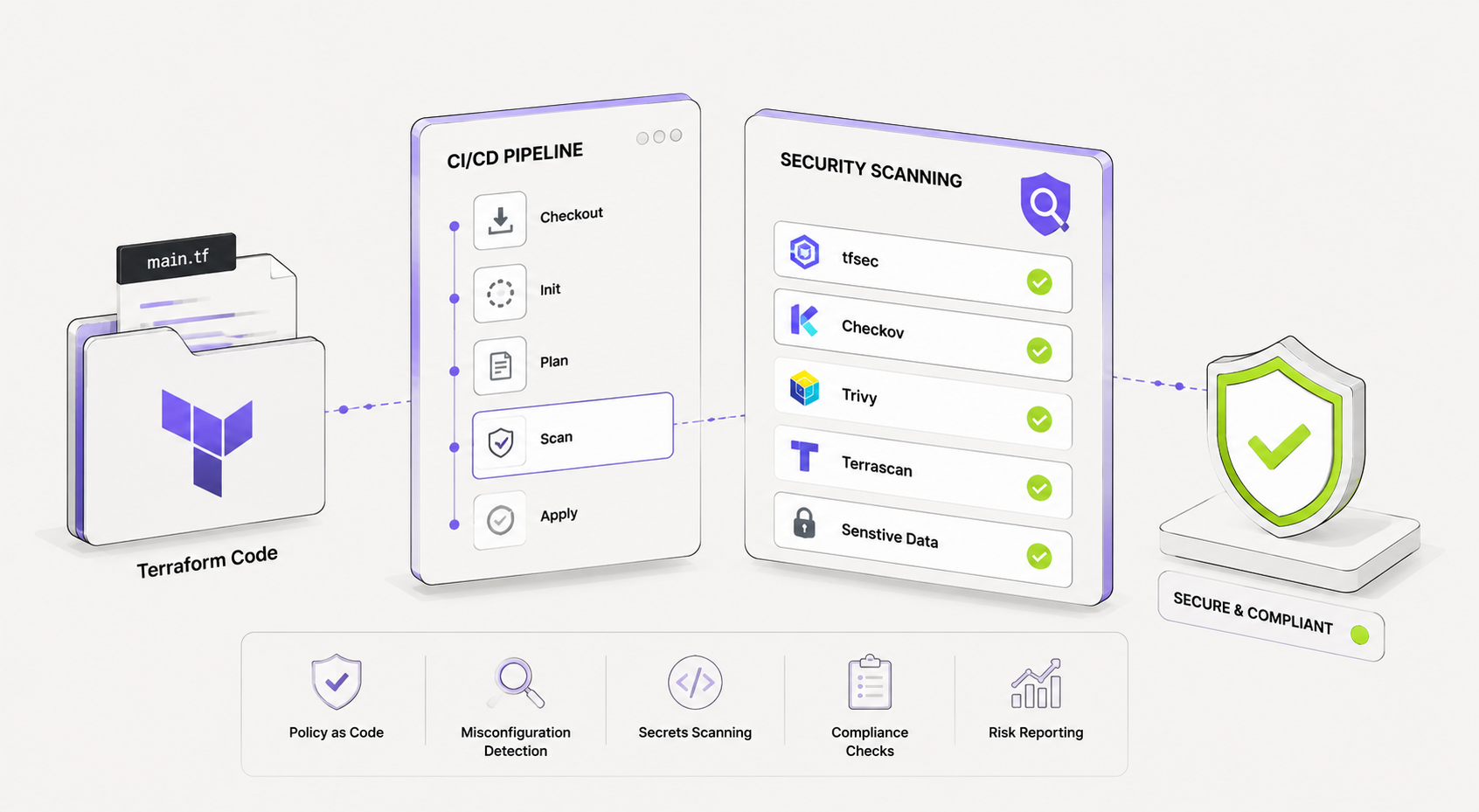
Shipping infrastructure code without security scanning is the IaC equivalent of deploying application code without tests. Misconfigurations — open S3 buckets, unencrypted databases, overly permissive IAM policies — are among the most common causes of cloud security incidents, and almost all of them are detectable before terraform apply ever runs.
This guide covers the leading scanning tools, how to integrate them into GitHub Actions and GitLab CI, how to enforce policy with OPA, and how to fix the findings that matter most.
Why Scan Terraform Code?
Terraform configurations define the attack surface of your cloud environment. A single misconfigured resource can expose data, allow lateral movement, or grant unintended public access. Security scanning addresses this at the source — in code, before infrastructure is provisioned.
The core benefits
Shift left on cloud risk. Catching a misconfigured security group in a pull request costs minutes to fix. Catching it after a breach costs far more. Static analysis of .tf files runs in seconds and blocks bad configurations before they reach any environment.
Encode your compliance requirements. Standards like CIS Benchmarks, SOC 2, PCI-DSS, and HIPAA map directly to Terraform resource attributes. Scanning tools ship with rule sets for these frameworks, so compliance checks become automated rather than periodic.
Reduce review burden on security teams. When common findings (no encryption, public exposure, missing logging) are caught automatically, security engineers can focus on architectural risk rather than configuration hygiene.
Create an auditable trail. Scan results in CI pipelines produce artifacts that demonstrate due diligence — useful for audits, compliance reviews, and incident post-mortems.
tfsec vs Checkov vs Terrascan
Three tools dominate the Terraform static analysis space. Each has a different philosophy, rule coverage, and integration model.
tfsec
tfsec (now maintained under Aqua Security's Trivy project) is purpose-built for Terraform. It parses HCL directly, understands module references, and evaluates resource configurations against a library of checks covering AWS, Azure, and GCP.
Strengths:
- Fast, lightweight, single binary
- Deep Terraform awareness (resolves variables, locals, module inputs)
- Clean output with direct links to remediation docs
- SARIF output for GitHub Code Scanning integration
Best for: Teams that primarily scan Terraform and want minimal setup.
Limitations: Terraform-only (no Kubernetes, CloudFormation). Custom rules require Go or Rego.
This snippet demonstrates how to use tfsec for Terraform security scanning.
It helps detect misconfigurations, insecure defaults, and compliance risks in your infrastructure code.
Basic Security Scan
GitHub-compatible SARIF Output
tfsec ./infra --format sarif --out results.sarif
The tfsec CLI analyzes your Terraform code and flags security issues before deployment.
Using SARIF output allows integration with GitHub Security tab for automated vulnerability tracking and reporting.
Checkov
Checkov by Prisma Cloud is a multi-framework scanner. It supports Terraform, Terraform Plan output (JSON), CloudFormation, Kubernetes, Helm, Dockerfiles, and more from a single tool.
Strengths:
- Scans terraform plan -out JSON — catches issues invisible to static HCL analysis (dynamic values, data sources)
- Broad framework coverage in one tool
- Python-based custom checks (accessible for teams without Go expertise)
- Large, actively maintained rule library (900+ checks)
- Native Secrets detection
Best for: Teams managing mixed IaC (Terraform + Kubernetes + Docker) who want a single scanner.
Limitations: Slower than tfsec on large repos. Python dependency may complicate some CI environments.
This workflow shows how to use Checkov to scan Terraform infrastructure for security misconfigurations.
It supports both direct directory scanning and more accurate Terraform plan analysis.
Scan Terraform Directory
Scan Terraform Plan (Recommended for Accuracy)
terraform plan -out tfplan.binary
terraform show -json tfplan.binary > tfplan.json
checkov -f tfplan.json
Running Checkov on a Terraform plan file provides more precise security analysis because it evaluates the *actual planned infrastructure changes*.
This helps catch risks before resources are deployed, improving overall infrastructure security posture.
Terrascan
Terrascan by Tenable focuses on policy-as-code using Rego (OPA's policy language) and ships with a large library of pre-built policies for cloud providers and compliance frameworks.
Strengths:
- Policies written in Rego — consistent with OPA workflows
- Supports Terraform, CloudFormation, Kubernetes, Helm, Kustomize, Dockerfiles
- Runtime scanning mode (detect drift between deployed and defined state)
- Good compliance framework mapping (NIST, CIS, PCI-DSS, SOC2)
Best for: Teams already using OPA/Rego for policy enforcement who want unified policy language across tools.
Limitations: Slower adoption, smaller community than Checkov. Rego learning curve for teams new to OPA.
This example demonstrates how to use Terrascan for Terraform security scanning.
It helps detect misconfigurations and policy violations in Infrastructure as Code before deployment.
Scan Terraform Directory
terrascan scan -i terraform -d ./infra
Export Results as JSON
terrascan scan -i terraform -d ./infra -o json
The -i terraform flag specifies the infrastructure type, while -d defines the directory to scan.
Using -o json allows integration with CI/CD pipelines and automated security reporting tools.
Comparison summary
| Feature |
tfsec |
Checkov |
Terrascan |
| Primary Language |
Go / Rego |
Python |
Go / Rego |
| Custom Rules |
Rego or YAML |
Python |
Rego |
| Plan File Scanning |
❌ Not Supported |
✅ Supported |
❌ Not Supported |
| Multi-Framework Support |
❌ Terraform-focused |
✅ Extensive multi-IaC support |
✅ Supports multiple frameworks |
| Speed |
⚡ Fastest |
Moderate |
Moderate |
| Community |
Large |
Largest |
Smaller |
| Best For |
Terraform-only teams |
Mixed Infrastructure-as-Code teams |
OPA-first and policy-driven teams |
Integrating into GitHub Actions
Add security scanning as a required check on pull requests so no Terraform change merges without a clean scan result.
tfsec in GitHub Actions
This GitHub Actions workflow runs a tfsec security scan on Terraform code whenever a pull request modifies .tf files.
It helps enforce infrastructure security checks automatically in CI/CD.
GitHub Security Workflow
# .github/workflows/terraform-security.yml

name: Terraform Security Scan

on:
  pull_request:
    paths:
      - '**.tf'

jobs:
  tfsec:
    name: tfsec
    runs-on: ubuntu-latest

    steps:
      - name: Checkout
        uses: actions/checkout@v4

      - name: Run tfsec
        uses: aquasecurity/tfsec-action@v1.0.0
        with:
          working_directory: ./infra
          soft_fail: false           # Fail the PR on findings
          format: sarif
          github_token: ${{ secrets.GITHUB_TOKEN }}
The soft_fail: false setting ensures the pipeline fails if security issues are detected, blocking unsafe changes from merging.
Output in SARIF format integrates directly with GitHub Security tab for visibility and tracking.
Setting soft_fail: false blocks the PR merge if any HIGH or CRITICAL findings are detected. Upload the SARIF file to GitHub Code Scanning to surface findings inline on the diff.
Checkov in GitHub Actions
This GitHub Actions workflow runs a Checkov security scan on Terraform code during pull requests.
It generates SARIF output and uploads results to GitHub Security for visibility and automated analysis.
Checkov Security Scan Workflow
name: Checkov Security Scan

on:
  pull_request:
    paths:
      - '**.tf'

jobs:
  checkov:
    name: checkov
    runs-on: ubuntu-latest

    steps:
      - name: Checkout
        uses: actions/checkout@v4

      - name: Run Checkov
        uses: bridgecrewio/checkov-action@v12
        with:
          directory: ./infra
          framework: terraform
          output_format: sarif
          output_file_path: results/checkov.sarif
          soft_fail: false
          # Skip specific checks if needed
          # skip_check: CKV_AWS_20,CKV_AWS_57

      - name: Upload SARIF
        uses: github/codeql-action/upload-sarif@v3
        if: always()
        with:
          sarif_file: results/checkov.sarif
The soft_fail: false setting ensures the pipeline fails when issues are detected, enforcing security gates.
Uploading SARIF results enables integration with GitHub Security Dashboard for centralized vulnerability tracking.
Scanning the plan file (recommended for Checkov)
For more accurate results, scan the plan JSON rather than raw HCL. This catches dynamic values, data source references, and module-resolved configurations:
This GitHub Actions snippet runs a Terraform plan and scans it with Checkov.
It improves security accuracy by analyzing the actual execution plan instead of static code only.
Terraform Plan Generation
- name: Terraform Plan
  run: |
    terraform init
    terraform plan -out tfplan.binary
    terraform show -json tfplan.binary > tfplan.json
  working-directory: ./infra
Checkov Plan-Based Scan
- name: Checkov Plan Scan
  uses: bridgecrewio/checkov-action@v12
  with:
    file: ./infra/tfplan.json
    framework: terraform_plan
Using terraform_plan mode allows Checkov to evaluate the *final planned infrastructure state*, not just source code.
This reduces false positives and improves detection of real-world security risks before deployment.
Integrating into GitLab CI
tfsec in GitLab CI
This GitLab CI pipeline runs a tfsec security scan on Terraform code.
It generates both machine-readable JSON output and human-readable CLI results, while integrating with GitLab Security Dashboard.
GitLab tfsec Security Pipeline
# .gitlab-ci.yml

tfsec:
  stage: validate
  image: aquasec/tfsec:latest

  script:
    - tfsec ./infra --format json --out tfsec-results.json
    - tfsec ./infra   # Second run for human-readable output and exit code

  artifacts:
    reports:
      # GitLab Security Dashboard integration
      sast: tfsec-results.json
    when: always

  rules:
    - changes:
        - "**/*.tf"
The JSON output is used for GitLab Security dashboards, while the second tfsec run ensures proper exit codes for CI enforcement.
This setup enables automated infrastructure security scanning on every Terraform change.
Checkov in GitLab CI
This GitLab CI job runs a Checkov security scan on Terraform infrastructure.
It outputs results in JUnit XML format for CI reporting and integrates with GitLab’s test and security dashboards.
Checkov GitLab CI Pipeline
checkov:
  stage: validate
  image: bridgecrew/checkov:latest

  script:
    - checkov -d ./infra
        --framework terraform
        --output junitxml
        --output-file checkov-results.xml
        --soft-fail

  artifacts:
    reports:
      junit: checkov-results.xml
    when: always

  rules:
    - changes:
        - "**/*.tf"
The --soft-fail flag allows the pipeline to continue even if issues are found, while still reporting them.
JUnit XML output enables structured visibility of security findings directly in GitLab’s CI interface.
GitLab's SAST dashboard will display findings from the JSON report. The JUnit report format surfaces test failures inline in merge request pipelines.
Blocking merges on failures
In GitLab, set the job as a required pipeline stage and use protected branches to prevent merging when the validate stage fails. Remove --soft-fail from the Checkov command to make the job exit non-zero on any finding above your threshold.
OPA with Terraform
Open Policy Agent (OPA) enables custom policy enforcement beyond what pre-built rule sets cover — business-specific requirements, tagging standards, naming conventions, approved AMI lists, and cost guardrails.
How it works with Terraform
OPA evaluates the Terraform plan JSON against Rego policies. The workflow is:
- Run terraform plan -out tfplan.binary
- Convert to JSON: terraform show -json tfplan.binary > tfplan.json
- Run OPA against the plan: opa eval --data policy.rego --input tfplan.json "data.terraform.deny"
Example: Enforce resource tagging
This Open Policy Agent (OPA) Rego policy enforces mandatory tagging standards for Terraform-managed AWS resources.
It ensures all aws_instance resources include required metadata before deployment.
Terraform Tagging Compliance Policy (Rego)
# policy/tagging.rego
package terraform

import input.resource_changes

deny[msg] {
  resource := resource_changes[_]
  resource.type == "aws_instance"
  not resource.change.after.tags.Environment

  msg := sprintf(
    "aws_instance '%s' is missing required tag: Environment",
    [resource.address]
  )
}

deny[msg] {
  resource := resource_changes[_]
  resource.type == "aws_instance"
  not resource.change.after.tags.Owner

  msg := sprintf(
    "aws_instance '%s' is missing required tag: Owner",
    [resource.address]
  )
}
These deny rules block Terraform plans that omit required tags like Environment and Owner.
This helps enforce governance, cost tracking, and accountability across all infrastructure resources.
Example: Block public S3 buckets
This Open Policy Agent (OPA) Rego policy prevents insecure S3 configurations by blocking buckets that allow public read access.
It enforces strict security compliance for Terraform-managed AWS resources.
S3 Public Access Restriction Policy (Rego)
# policy/s3.rego
package terraform

deny[msg] {
  resource := input.resource_changes[_]
  resource.type == "aws_s3_bucket_acl"
  resource.change.after.acl == "public-read"

  msg := sprintf(
    "S3 bucket '%s' must not have public-read ACL",
    [resource.address]
  )
}
The deny rule ensures that any Terraform plan attempting to set an S3 bucket ACL to public-read will fail.
This helps prevent accidental data exposure and enforces a secure-by-default cloud posture.
Running OPA in CI
This script acts as a policy enforcement gate using Open Policy Agent (OPA).
It evaluates Terraform plan data and fails the pipeline if any deny rules are triggered.
OPA Policy Gate Script
# Exit non-zero if any deny rules fire

RESULTS=$(opa eval \
  --data ./policy \
  --input tfplan.json \
  --format raw \
  "count(data.terraform.deny) > 0")

if [ "$RESULTS" == "true" ]; then
  echo "Policy violations found:"
  opa eval --data ./policy --input tfplan.json "data.terraform.deny"
  exit 1
fi
The opa eval command checks Terraform plan output against defined Rego policies.
If any violations exist, the script prints detailed results and exits with a non-zero status to block deployment in CI/CD pipelines.
OPA gives security and platform teams a policy layer they own, separate from the scanner rule sets, enforced consistently across all pipelines.
Pre-Plan vs Post-Plan Scanning
When you add scanning to a pipeline, you must decide where it runs relative to terraform plan.
Pre-plan scanning (static HCL analysis)
Runs directly against .tf source files, before any Terraform commands execute.
Advantages:
- Fast — no Terraform init or provider downloads required
- Runs on every commit or PR without cloud credentials
- Catches obvious misconfigurations early
Limitations:
- Cannot evaluate dynamic values (variable defaults, data sources, module outputs)
- May miss issues that only appear in the resolved plan
- Higher false positive rate for complex configurations
Best tools: tfsec, Checkov (-d mode), Terrascan
Use when: You want fast feedback on pull requests with no cloud access required.
Post-plan scanning (plan file analysis)
Runs against the JSON output of terraform plan, after Terraform has resolved all variables, modules, and data sources.
Advantages:
- Evaluates the actual configuration that will be applied
- Catches issues in dynamically constructed resource attributes
- Lower false positive rate
- Enables OPA policy enforcement against real resource values
Limitations:
- Requires Terraform init, cloud credentials, and provider access
- Slower — not suitable for every commit
- Plan output may contain sensitive values
Best tools: Checkov (-f tfplan.json), OPA, Conftest
Use when: You want high-confidence results before applying to a real environment (e.g., in a deploy pipeline after PR merge).
Recommended approach
Run both. Use pre-plan scanning (tfsec or Checkov HCL mode) on every pull request for fast feedback. Add post-plan scanning (Checkov plan mode + OPA) in the deployment pipeline before terraform apply runs against staging and production. This gives you speed early and accuracy late.
Fixing Common Findings
These are the most frequently flagged issues in Terraform security scans, and how to resolve them.
Unencrypted S3 bucket
This example shows a before vs after Terraform improvement where an S3 bucket is upgraded from a basic configuration to a secure setup with AWS KMS encryption.
Before: Basic S3 Bucket (No Encryption)
resource "aws_s3_bucket" "data" {
  bucket = "my-data-bucket"
}
After: S3 Bucket with KMS Encryption
resource "aws_s3_bucket" "data" {
  bucket = "my-data-bucket"
}

resource "aws_s3_bucket_server_side_encryption_configuration" "data" {
  bucket = aws_s3_bucket.data.id

  rule {
    apply_server_side_encryption_by_default {
      sse_algorithm = "aws:kms"
    }
  }
}
Adding server-side encryption ensures all objects stored in the bucket are protected at rest using AWS KMS.
This upgrade significantly improves security posture without changing the existing bucket structure or workflow.
Security group open to 0.0.0.0/0
This example demonstrates a security hardening change in AWS Security Groups, replacing overly permissive SSH access with a restricted network range.
It highlights a common infrastructure security improvement.
Before: Open SSH Access (Insecure)
resource "aws_security_group_rule" "ssh" {
  type        = "ingress"
  from_port   = 22
  to_port     = 22
  protocol    = "tcp"
  cidr_blocks = ["0.0.0.0/0"]  # flagged
}
After: Restricted SSH Access (Secure)
resource "aws_security_group_rule" "ssh" {
  type        = "ingress"
  from_port   = 22
  to_port     = 22
  protocol    = "tcp"
  cidr_blocks = ["10.0.0.0/8"]
}
Replacing 0.0.0.0/0 with a private CIDR range significantly reduces exposure to brute-force attacks.
In production environments, using AWS Systems Manager Session Manager instead of SSH is considered an even more secure best practice.
RDS instance publicly accessible
This example shows a security improvement for AWS RDS, where a database instance is hardened by removing public internet exposure and placing it inside a private subnet.
Before: Publicly Accessible Database (Risky)
resource "aws_db_instance" "app" {
  publicly_accessible = true  # flagged
  ...
}
After: Private Database Configuration (Secure)
resource "aws_db_instance" "app" {
  publicly_accessible   = false
  db_subnet_group_name  = aws_db_subnet_group.private.name
  ...
}
Setting publicly_accessible = false ensures the database cannot be reached from the public internet.
Placing the instance in a private subnet group enforces network isolation and significantly reduces attack surface.
CloudTrail logging disabled
This example shows a security improvement for AWS RDS, where a database instance is hardened by removing public internet exposure and placing it inside a private subnet.
Before: Publicly Accessible Database (Risky)
resource "aws_db_instance" "app" {
  publicly_accessible = true  # flagged
  ...
}
After: Private Database Configuration (Secure)
resource "aws_db_instance" "app" {
  publicly_accessible   = false
  db_subnet_group_name  = aws_db_subnet_group.private.name
  ...
}
Setting publicly_accessible = false ensures the database cannot be reached from the public internet.
Placing the instance in a private subnet group enforces network isolation and significantly reduces attack surface.
IAM policy with wildcard actions
This example shows a security improvement for AWS RDS, where a database instance is hardened by removing public internet exposure and placing it inside a private subnet.
Before: Publicly Accessible Database (Risky)
resource "aws_db_instance" "app" {
  publicly_accessible = true  # flagged
  ...
}
After: Private Database Configuration (Secure)
resource "aws_db_instance" "app" {
  publicly_accessible   = false
  db_subnet_group_name  = aws_db_subnet_group.private.name
  ...
}
Setting publicly_accessible = false ensures the database cannot be reached from the public internet.
Placing the instance in a private subnet group enforces network isolation and significantly reduces attack surface.
env0 Policy Enforcement
env0 integrates security scanning and OPA policy enforcement natively into its environment management platform, providing guardrails without requiring teams to wire up CI pipelines manually.
How env0 enforces policy
- Built-in OPA integration: Define Rego policies in env0 and attach them to environments or organizations. Policies are evaluated against the Terraform plan before every apply — no additional pipeline configuration required.
- Pre-apply policy gates: If a plan violates a policy, the apply is blocked and the violation is surfaced in the env0 UI with the specific resource and rule that failed.
- Custom policy libraries: Import your own Rego policies alongside env0's managed policy templates for CIS, SOC 2, and other frameworks.
- Role-based overrides: Platform teams can configure which roles can override policy failures (e.g., a security admin can approve a flagged change), creating an auditable approval flow without a hard block.
This model is well-suited to teams that want centralized policy management across multiple workspaces and providers without maintaining scanner configuration in every repository.
Summary
A complete Terraform security scanning strategy combines:
- Static HCL scanning (tfsec or Checkov) on every pull request for fast, low-overhead feedback
- Plan file scanning (Checkov or OPA) in deployment pipelines for high-fidelity results before apply
- Custom OPA policies for organizational requirements that generic rule sets don't cover
- Systematic remediation of the highest-severity findings first (public exposure, no encryption, wildcard IAM)
Security scanning shifts cloud risk left without slowing teams down — when integrated correctly, it adds seconds to a pipeline and eliminates the class of misconfigurations responsible for the majority of cloud incidents.
.webp)