.webp)
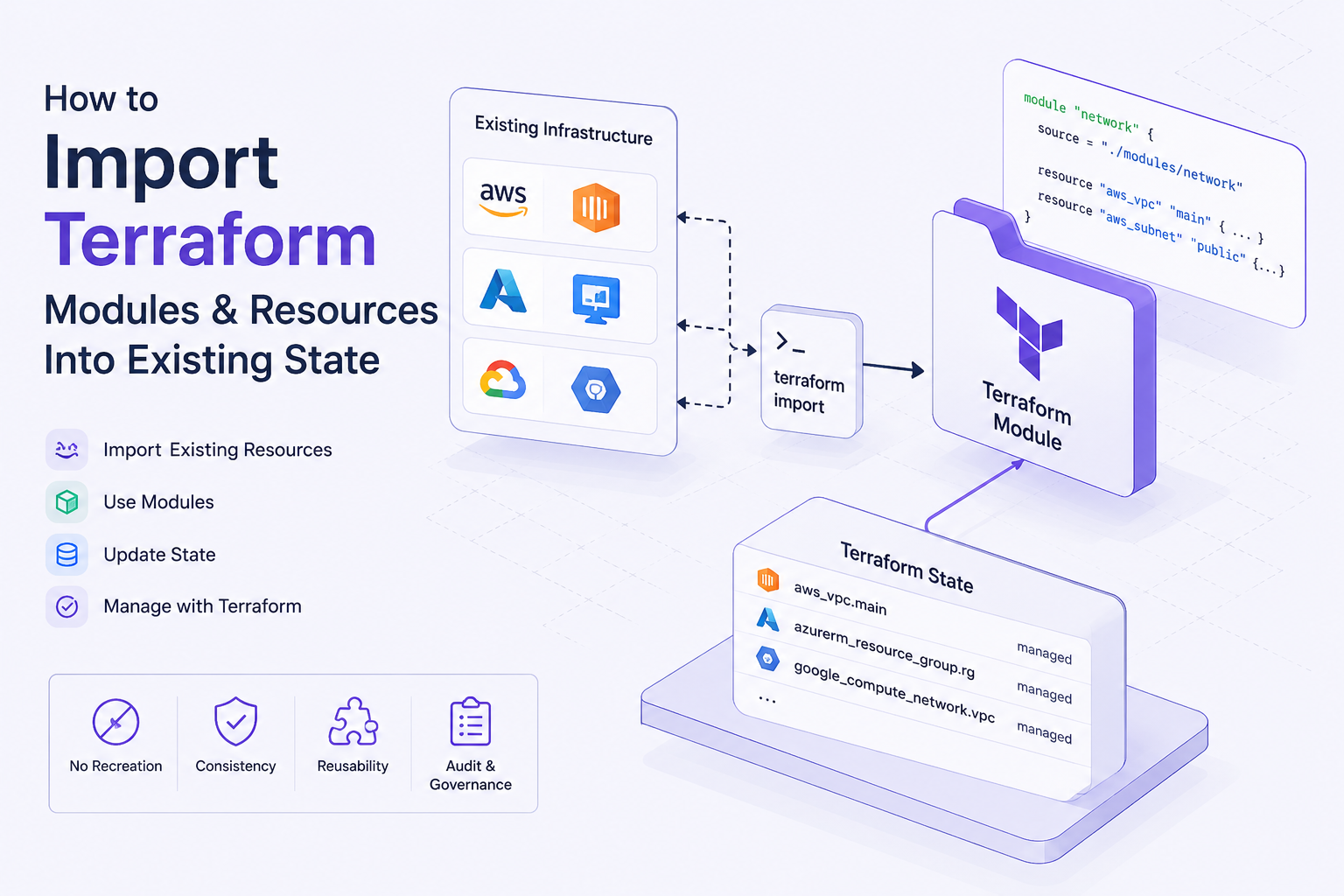
In large-scale cloud environments, infrastructure is often provisioned outside of Terraform, using console operations, automation scripts, or legacy tools. As organizations adopt Infrastructure as Code (IaC), a common challenge emerges: how to bring these existing resources under Terraform management without recreating them. Terraform’s terraform import command solves this problem by mapping pre-existing resources to Terraform state.
However, as infrastructure complexity grows, using modules becomes essential. Modules allow teams to encapsulate reusable configurations, standardize deployments, and maintain consistency across environments. Importing resources directly into modules ensures that the IaC model remains coherent, maintainable, and auditable. Unlike simple flat imports, module imports require a precise understanding of module address syntax, resource identifiers, and the relationship between resources.
This guide walks you through module imports in depth, covering advanced module syntax, step-by-step examples for AWS, Azure, and GCP, handling dependencies, bulk imports, refactoring, state cleanup, common errors, and governance with tools like env zero. By the end, your team will have a clear methodology for safely bringing existing infrastructure into Terraform-managed modules.
Understanding Terraform Modules and Their Importance
Terraform modules are reusable units of infrastructure configuration. A module can include resources, variables, outputs, and nested modules, providing a clean abstraction layer. Using modules enables teams to enforce consistent architecture patterns, reduce duplication, and simplify management across multiple environments.
For example, a company might have a network module that defines VPCs, subnets, and security groups. Multiple environments — development, staging, and production — can instantiate this module with different input parameters, but the underlying code remains consistent. When resources are created outside Terraform, importing them directly into modules ensures that the IaC model accurately represents the infrastructure hierarchy, maintaining integrity, traceability, and governance.
Module Address Syntax Explained
Importing resources into modules requires precise addressing. Each module instance is represented in the Terraform state hierarchy, and resources inside modules must be referenced correctly:
- Single-level module:
terraform import module.network.aws_vpc.main vpc-0a1b2c3d4e5f6g7h
- Nested modules:
terraform import module.platform.module.network.aws_vpc.main vpc-0a1b2c3d4e5f6g7h
- Array of module instances:
terraform import module.storage[0].aws_s3_bucket.logs company-logs-bucket
Understanding this hierarchy is crucial. The module path (module.network or module.platform.module.network) ensures the imported resource maps to the correct state namespace. Misaddressed imports can lead to state inconsistencies, duplicated resources, or untracked modules.
Step-by-Step Example: Importing into a Module
- Define the Module Block
Ensure your Terraform configuration includes the module block and resource definitions that match the existing infrastructure:
- Identify the Resource
Determine the cloud provider’s unique identifier for the resource (e.g., AWS EC2 instance ID, Azure resource ID, GCP project/resource name). - Construct the Module Address
Combine the module instance path with the resource type and name:
terraform import module.network.aws_vpc.main vpc-0a1b2c3d4e5f6g7h
- Verify the Import
After running the import, check the state:
terraform state list
terraform plan
- Align Configuration Attributes
Update the module’s resource block to reflect the imported resource’s actual attributes. Differences will appear in terraform plan and must be resolved before applying changes.
Importing Complex Resources with Dependencies
Many resources have dependencies. For example, an EC2 instance might depend on a VPC, security group, and subnet. When importing such resources:
- Import foundational resources first: VPCs and subnets should be imported before dependent instances.
- Use sequential import commands: Ensure resources are mapped in state in the correct order.
- Validate with plan: Run terraform plan after each import to catch attribute mismatches or missing references.
This ensures that Terraform maintains a correct dependency graph and prevents drift or resource conflicts.
Bulk Import Strategy
For large environments, manual imports are inefficient. Teams can adopt bulk import strategies:
- Scripting: Generate import commands dynamically using cloud APIs to enumerate existing resources.
- CI/CD pipelines: Automate import execution during initial provisioning or onboarding of existing environments.
- Environment templates: Use import blocks in declarative configurations to standardize bulk imports across multiple environments.
These strategies reduce human error, improve repeatability, and allow teams to scale Terraform adoption efficiently.
Refactoring After Import
After resources are imported into modules:
- Align resource attributes: Ensure Terraform code reflects the actual resource state.
- Parameterize inputs: Replace hard-coded values with variables for flexibility and reuse.
- Adjust outputs: Expose the imported resources appropriately for other modules or top-level configurations.
- Commit changes: Maintain version control for auditability and traceability.
Refactoring ensures that the module remains reusable, maintainable, and consistent across environments.
Terraform State Cleanup
Module imports may leave orphaned or outdated entries in the state. Effective state management includes:
- terraform state list to identify imported resources.
- terraform state rm for obsolete resources.
- terraform state mv to move resources between modules or namespaces.
- Regular audits to ensure state reflects real infrastructure.
Using remote backends with versioning and locking is highly recommended for module imports, especially in team environments.
Common Pitfalls and Troubleshooting
- Incorrect module address: Multi-level or arrayed modules require exact syntax.
- Attribute mismatch: Resource block must match existing resource attributes.
- Dependency ordering: Import foundational resources before dependent resources.
- Concurrent imports: Ensure remote backend locks are in place to avoid state corruption.
- Provider misconfiguration: Verify credentials, regions, and account alignment.
Careful planning and validation prevent common import failures and maintain consistent state integrity.
Integrating with env zero
Env zero enhances module imports by providing:
- Approval workflows: Ensure imported resources are reviewed before state is updated.
- RBAC: Control which team members can import or manage specific resources.
- Drift detection: Monitor imported resources for unauthorized changes.
- Audit logging: Track every import operation and associated metadata.
This integration ensures that module imports adhere to organizational policies, maintain compliance, and reduce operational risk.
Best Practices for Module Imports
- Plan imports carefully, mapping resources to the correct module instance.
- Use remote backends with locking to prevent concurrent import conflicts.
- Validate resource attributes in configuration to avoid unexpected plan diffs.
- Script bulk imports where possible to improve repeatability.
- Refactor modules post-import to maintain reusability and clarity.
- Integrate governance and audit workflows for compliance and team visibility.
Summary
Importing resources into Terraform modules allows organizations to bring existing infrastructure under declarative management, maintaining consistency, auditability, and repeatability. By understanding module addresses, handling dependencies, adopting bulk strategies, refactoring configuration, and cleaning up state, teams can safely integrate legacy resources into modular IaC setups.
When combined with remote backends, locking, versioning, and governance tools like env zero, module imports become a structured, automated, and compliant process. Following these strategies enables teams to scale Terraform adoption across environments and accounts while maintaining operational reliability and security.
Frequently Asked Questions (FAQs)
What is the difference between importing a resource into a module vs a root module?
When resources are imported into a root module (top‑level configuration), you import them using just the resource address, like aws_instance.web i‑0123456789. But when importing into a child module, you must include the module’s path in the resource address. This tells Terraform exactly which module instance should own the resource. For example, module.network.aws_vpc.main vpc‑0a1b2c3d… ensures that the VPC is tracked under the network module rather than at the root level. The extra address context avoids confusion and keeps state organized.
How do I find the correct module address for import?
Terraform constructs module addresses based on how modules are instantiated in your configuration. For single modules, the address starts with module.<name> followed by the resource type and name. For nested modules, you chain them like module.parent.module.child…. If a module is instantiated multiple times using for_each or count, additional indexes or keys appear in the address. Running commands like terraform state list or inspecting a sample plan helps reveal the current module paths so you can build the correct import address.
Can I import resources into modules created by other teams?
Yes — but it requires coordination. Terraform state is shared, and the import needs to reference the exact module structure defined in code. If another team defined the module, you must match their module paths, resource names, and configuration exactly. It may help to collaborate on a shared repository or review their Terraform codebase to understand how resources should be addressed before running the import.
Is it safe to import resources into modules in production?
Import itself does not modify the actual infrastructure, so it’s safe in the sense that it won’t create, update, or destroy cloud resources. However, importing into production still requires caution. Make sure remote state locking is enabled, test imports in a staging environment, and validate that the configuration aligns with real infrastructure before applying changes. Running terraform plan post‑import helps verify that no unintended drifts will be applied.
What happens if I import a resource with incorrect attributes?
If you import a resource but the Terraform configuration does not match the actual state — for example, wrong tags or attributes — Terraform will show proposed changes in the plan. These are not automatically applied, but they indicate mismatches that you need to fix. Carefully updating the configuration to reflect the real resource state ensures that future applies do not accidentally overwrite settings.
Can I import one resource into multiple modules?
No. In Terraform state, a resource must belong to a single module or root context. If you need similar infrastructure in multiple modules, you must import each separately with the correct module address or instantiate modules independently. Terraform treats each imported resource uniquely based on its address path in the state.
Does importing a resource automatically update Terraform code?
No. Importing adds the resource to the Terraform state file but does not generate or update the corresponding .tf configuration automatically. You still need to write or adjust the resource block inside your module so that it matches the imported state. Tools like terraform import -generate-config-out can help generate skeleton configuration, but human review and refinement are recommended.
What if a module import fails due to a missing module in the configuration?
If Terraform can’t find the module path you specified, you will get an error. This usually means the module isn’t present in your current configuration or the module’s name/path doesn’t match. Double‑check your module blocks, ensure they are included in your configuration, and run terraform init to download or initialize them before importing. Module import must reference a module that exists in your codebase.
How do I handle dependent resources when importing modules?
Some resources depend on others (e.g., an EC2 instance depends on a VPC). Import dependent resources in a logical order: import foundational infrastructure (like VPCs and subnets) before importing dependent resources (like instances or load balancers). This helps Terraform correctly build the dependency graph in state and prevents errors where dependent resources lack referenced IDs.
Can I automate module imports in CI/CD pipelines?
Yes. Declare import blocks where supported, or script the import process in your CI/CD pipeline. Using automation ensures consistency across environments, reduces manual steps, and allows imports to be included as part of standard provisioning workflows. However, ensure that pipelines run in a context where remote state is accessible and locking is enabled to prevent conflicts.
How do governance tools like env zero help with module imports?
Governance tools like env zero enhance module import workflows by adding review and approval gates, role-based access control (RBAC), drift detection, and audit trails. Instead of running imports manually, teams can enforce approval steps in pipelines, track who imported what and when, and monitor for any unauthorized state changes post‑import. This is particularly valuable in regulated environments or large organizations with multiple teams.
Should I document module imports and state changes?
Yes. Because module imports link real infrastructure to Terraform state, documenting the reason for the import, the resource IDs, and the module addresses helps team members understand the context. This is especially helpful for onboarding, audits, or future troubleshooting. Include comments in the configuration or maintain a change log in version control.