.webp)
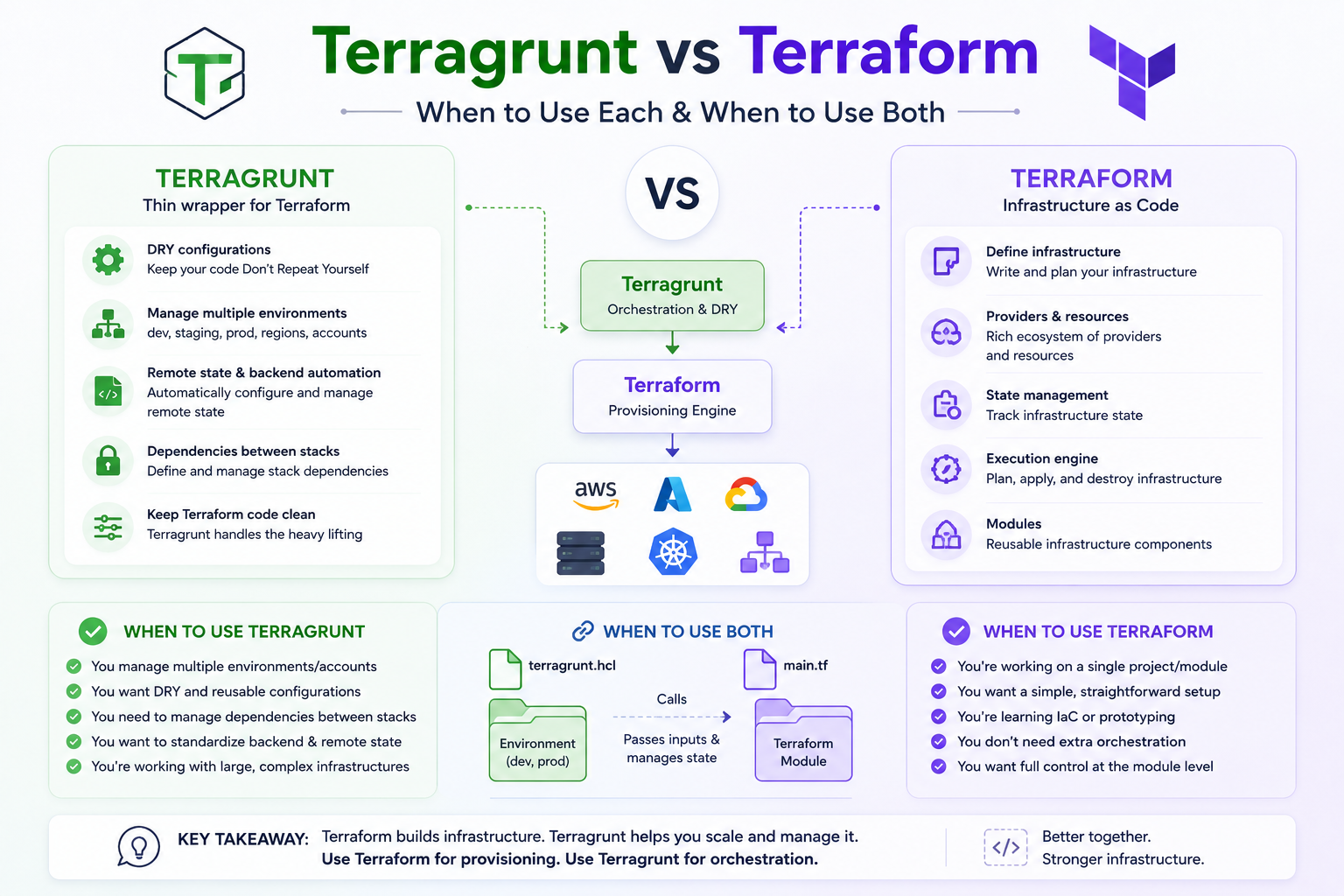
Terraform is the foundation. Terragrunt is a layer on top of it. They are not competing tools — one does not replace the other — but the decision about whether to add Terragrunt to your stack is real and worth thinking through carefully.
Add it too early and you have introduced complexity your team does not need yet. Add it too late and you are untangling copy-pasted configurations across dozens of directories and wishing you had done it sooner.
This guide gives you a clear picture of what each tool actually does, where their responsibilities differ, and how to know which combination is right for where your team is today.
💡 Short answer: Terraform alone is the right starting point for most teams. Terragrunt becomes worth adding once you are managing more than two or three environments, working across multiple cloud accounts, or finding yourself copy-pasting backend and provider configuration repeatedly.
What Problem Does Terragrunt Actually Solve?
Terraform is excellent at what it does: describing infrastructure as code and applying that description to a cloud provider. What it deliberately does not solve is how to organise that infrastructure across many environments, accounts, and teams without repeating yourself.
As a result, most teams that grow beyond a handful of Terraform configurations run into the same set of friction points:
Backend Configuration Repetition
Every Terraform environment needs its own backend block. That block contains the S3 bucket name, the DynamoDB table for locking, the AWS region, and the state key path. For two environments, this is manageable. For twenty environments across three regions, you have sixty versions of nearly identical configuration. Change the bucket name and you are making sixty edits.
Provider Configuration Repetition
Similarly, provider blocks tend to be repeated across every module. Same pattern, slightly different values. The same update-everywhere problem applies.
No Cross-Module Dependency System
Terraform handles dependencies between resources inside a single state file very well. It does not, however, provide any built-in way to express that the database module depends on the networking module, or that the application module needs outputs from both. Teams work around this with manual apply ordering, which is error-prone and hard to enforce in CI/CD.
No Multi-Module Run Command
Running terraform apply across twenty modules in the correct dependency order is not something Terraform does on its own. Teams end up writing custom scripts or CI/CD pipeline orchestration to handle this — which works, but is brittle and hard to maintain.
Terragrunt was built specifically to address these four problems. It does not touch what Terraform does well. It adds the organisational layer that Terraform leaves to the user.
DRY Configurations: Terraform vs Terragrunt
The clearest way to see the difference is to look at how backend configuration works in each approach.
With Plain Terraform
Every environment directory contains its own backend block. Here is what that looks like for a three-environment project:
Three files. Three copies of the same block. Every change to the shared configuration requires three edits. At twenty environments, you have twenty copies.
With Terragrunt
The backend configuration is defined once in a root terragrunt.hcl file. The key path is generated automatically using the module’s directory path. Each environment file inherits everything from the root and only specifies what differs:
Change the bucket name once. All environments inherit the update. The key path is generated dynamically — no manual management required.
Dependency Management: Where Terragrunt Pulls Ahead
This is the area where Terragrunt provides the most concrete operational value beyond DRY configuration.
In a real infrastructure setup, modules depend on each other. The application module needs the VPC ID from the networking module and the database endpoint from the database module. With plain Terraform in separate state files, there is no built-in mechanism to express or enforce this. You either combine everything into one large state file (which creates its own problems at scale) or you manage the apply order manually.
With Terragrunt’s dependency block, you declare the relationship explicitly:
When you run terragrunt run-all apply from the parent directory, Terragrunt builds the full dependency graph and applies modules in the correct order. Networking first, database second, application third. No manual orchestration, no custom scripts.
Terraform Workspaces vs Terragrunt: An Honest Comparison
Terraform workspaces come up frequently in this comparison because they are Terraform’s built-in mechanism for managing multiple environments. They are worth understanding clearly, because many teams reach for them first and discover their limitations only after they have built on them.
Workspaces let you maintain separate state files for the same configuration. When you switch from the default workspace to a prod workspace, Terraform uses a different state file but the same backend and the same configuration. This sounds like it solves the multi-environment problem, and for small projects it can.
The issue is that workspaces conflate two things that benefit from being separate: execution isolation (different state files) and configuration isolation (different settings, different sizes, different policies). Terraform’s own documentation notes that workspaces are not a suitable isolation mechanism for production-grade environment separation, particularly in multi-account setups where each environment should sit in its own AWS account or Azure subscription.
ScenarioTerraform WorkspacesTerragruntMultiple envs, same configBuilt-in, works wellWorks but adds directory structure; worth it only at larger scaleDifferent config per envMessy: requires conditionals on workspace nameClean: each env folder has its own inputsMulti-account AWS / AzureAll workspaces share one backend, poor isolationEach env has its own backend config, proper account isolationCross-module dependenciesNot supportedFirst-class dependency block supportRun all modules in orderNot supported nativelyrun-all with dependency graph orderingBackend config DRYNo, repeated per environmentYes, defined once, inherited everywhereLearning curveLow, built into TerraformMedium, new tool, new patterns to learnProduction suitabilityLimited, HashiCorp recommends against for prod isolationDesigned for production multi-environment use
⚠️ HashiCorp’s own documentation recommends against using workspaces as the primary mechanism for environment isolation in production. They are useful for local development and testing, but not as a substitute for proper environment separation at the backend level.
Multi-Account Deployments: Where Terragrunt Is Almost Essential
If there is one scenario where Terragrunt goes from “useful” to “practically essential,” it is multi-account cloud deployments.
Best practice for cloud infrastructure is to separate environments across different cloud accounts. Production runs in its own AWS account. Staging in another. Development in a third. This separation limits blast radius: a mistake in development cannot affect production state because they are in entirely different accounts with entirely different credentials and entirely different backend configurations.
With plain Terraform, managing this means maintaining separate provider configurations, separate backend configurations, and separate variable sets for each account. At three accounts this is manageable. At ten accounts across three regions, you have a configuration management problem.
Terragrunt handles this cleanly. The root terragrunt.hcl file can use locals to define account IDs and regions, and each environment file inherits and overrides only what it needs. Adding a new account means adding a directory and an environment file, not updating dozens of existing configurations.
The generate block creates the provider configuration file at runtime. Each environment inherits the correct account ID from its account.hcl file. Provider configuration is DRY, account-specific, and never manually maintained per environment.
Full Comparison: Plain Terraform vs Terraform + Terragrunt
Area
Plain Terraform
Terraform + Terragrunt
Verdict
Backend config
Repeated per environment
Defined once, generated automatically
Terragrunt
Provider config
Repeated per environment
Defined once via generate blocks
Terragrunt
Multi-env state
Workspaces or manual folder management
Directory-based with automatic state keys
Terragrunt
Cross-module deps
Manual ordering or monolithic state
dependency block with auto graph resolution
Terragrunt
Multi-module run
Manual scripts or CI orchestration
run-all with dependency ordering built in
Terragrunt
Multi-account support
Manual per-account config
Account hierarchy via locals + generate
Terragrunt
Toolchain simplicity
One tool, no wrapper
Two tools, extra concepts to learn
Terraform
Single env / project
Clean and sufficient
Adds overhead without clear benefit
Terraform
OpenTofu support
Native
Native — defaults to tofu binary
Both work
CI/CD integration
Standard terraform commands
terragrunt commands, same structure
Both work
Learning curve
Lower — well-documented
Medium — new patterns and HCL extensions
Terraform
Managed platform support
env zero, Spacelift, Scalr
env zero, Spacelift, Scalr
Both work
Performance Considerations
One thing worth being honest about: Terragrunt adds overhead, and at very large scale that overhead can become noticeable.
Each Terragrunt unit runs in a temporary directory and shells out to the underlying Terraform or OpenTofu binary. At a small number of modules, the overhead is negligible. As the number of modules grows into the hundreds, the cumulative time for Terragrunt to set up and tear down those temporary directories adds up.
There have been documented performance issues in certain Terragrunt version ranges with O(n²) dependency resolution behaviour in very large stacks. The Gruntwork team has addressed several of these in the v1.0 series. The practical advice: pin your Terragrunt version explicitly, test run-all performance before relying on it for time-sensitive deployments, and consider splitting very large stacks into sub-stacks if apply times become a concern.
For the majority of teams — those managing dozens rather than hundreds of modules — performance is not a meaningful concern in practice.
Team Size and Scale: When Does Terragrunt Make Sense?
The right answer depends not just on how many environments you have, but on how your team is structured and how fast your infrastructure is growing.
Team / Scale
Recommendation
Reasoning
Solo / small team 1–2 environments
Plain Terraform
Terragrunt’s benefits do not outweigh the added complexity. Keep it simple.
Small team 3–5 environments
Terraform, consider Terragrunt
If you feel the copy-paste pain, add Terragrunt now before it compounds.
Medium team 5–15 environments
Terraform + Terragrunt
The DRY and dependency benefits are clear at this scale. Worth the investment.
Large team 15+ environments
Terraform + Terragrunt
Terragrunt becomes load-bearing. Multi-account setup needs it.
Multi-account Any size
Terraform + Terragrunt
Proper account isolation is difficult without Terragrunt at any scale.
Platform team serving multiple squads
Terraform + Terragrunt + managed platform
Add env zero or similar for governance, approvals, and drift detection across the full stack.
Terragrunt vs Terraform Cloud / HCP Terraform
This comparison comes up less often but is worth addressing because the tools overlap in some areas and differ significantly in others.
HCP Terraform (formerly Terraform Cloud) is a managed platform that handles remote state, remote execution, team access controls, and policy enforcement. Terragrunt is an open source wrapper that handles DRY configuration and multi-module orchestration.
They operate at different layers. You can use Terragrunt with HCP Terraform, Terragrunt with a self-managed backend, or HCP Terraform without Terragrunt. The choice of orchestration tool and the choice of managed platform are separate decisions.
The reason teams often compare them is that both can reduce some of the friction around multi-environment management. HCP Terraform does this through its workspace and run management features. Terragrunt does it through configuration inheritance and dependency management. They are complementary rather than competing, but many teams — especially those who moved away from HCP Terraform after the free tier ended in March 2026 — find that Terragrunt with a standard S3 backend provides most of what they need without a commercial dependency.
Using Terraform and Terragrunt Together with env zero
env zero supports both plain Terraform and Terragrunt configurations natively. You can manage Terraform environments and Terragrunt environments from the same platform, with the same governance controls applied to both.
For Terragrunt users, env zero maps each Terragrunt unit to an environment. You get the same plan-and-apply workflow, approval gates, drift detection, cost estimation, and audit trail that you would for any other environment — without changing your terragrunt.hcl files.
The combination of Terragrunt handling DRY configuration and dependency ordering, and env zero handling governance, approvals, and visibility, covers the full operational stack. Terragrunt keeps your IaC clean. env zero makes sure it runs safely.
🚀 Teams that have outgrown managing CI/CD pipelines manually for Terragrunt often find that env zero removes the last piece of DIY infrastructure from their IaC workflow. Your terragrunt.hcl files stay as they are. env zero handles the rest.
Summary
Terraform and Terragrunt are not competitors. Terraform defines your infrastructure. Terragrunt organises how you run Terraform across many environments without repeating yourself.
Plain Terraform is the right starting point. It is well-documented, widely understood, and sufficient for most teams early in their infrastructure journey. The time to add Terragrunt is when you feel the specific friction it was built to address: repeated backend configuration, no cross-module dependency management, or the complexity of multi-account deployments.
Terraform workspaces are useful for simple local development scenarios but are not a substitute for Terragrunt at production scale. HashiCorp’s own documentation says as much.
For teams already at scale, Terragrunt and a managed platform like env zero together cover the full stack: DRY configuration and dependency management from Terragrunt, governance and operational visibility from env zero.