.webp)
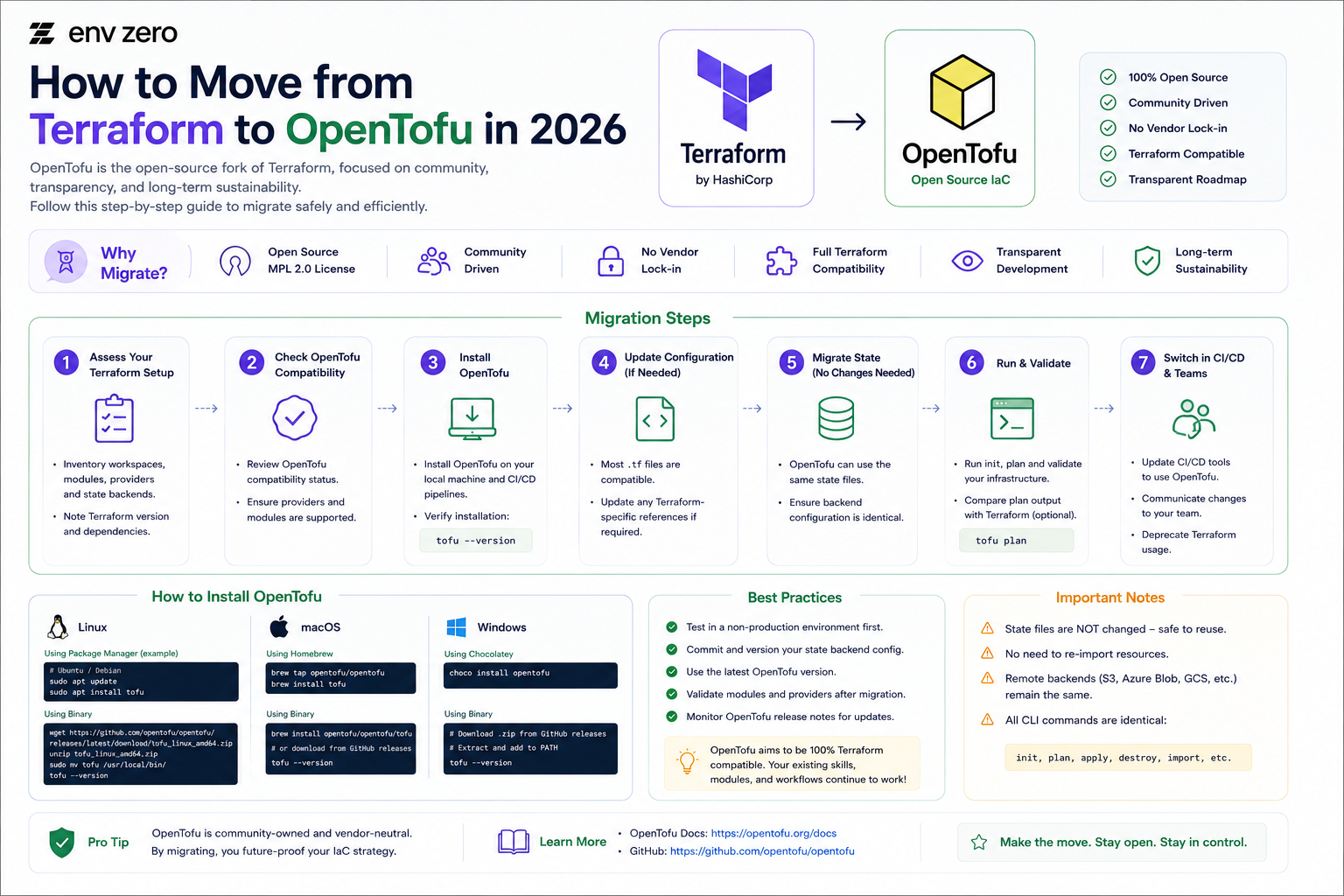
Migrating from Terraform to OpenTofu is one of those tasks that sounds more daunting than it actually is. For most teams, the migration is a binary swap: install OpenTofu, run tofu init, confirm the plan shows no changes, and update your CI/CD pipeline. That is genuinely it for the majority of configurations.
Where things get more involved is when you are running Terraform Cloud as your remote backend, using Sentinel for policy enforcement, or relying on Terraform features that OpenTofu has not yet implemented. Those situations need extra steps and more planning — but they are well understood and manageable.
This guide walks through the full migration process: from the pre-flight checks you should run before touching anything, through the migration itself, to CI/CD updates, testing, and keeping a clean rollback path in case you need it.
💡 OpenTofu was designed from day one to be a drop-in replacement for Terraform. The state file format is identical, the HCL syntax is the same, and most providers work without modification. If tofu plan shows no changes after init, your migration is essentially complete.
Why Teams Are Migrating in 2026
Most teams evaluating this migration are motivated by one or more of the following:
• Licensing clarity. OpenTofu uses the Mozilla Public License 2.0, which is an OSI-approved open source license with no commercial restrictions. Terraform’s Business Source License 1.1 (BSL) introduced ambiguity that legal and procurement teams at many organisations are no longer comfortable with.
• OpenTofu-only features. Native state encryption, ephemeral values (secrets that never touch the state file), dynamic lifecycle controls, and provider iteration with for_each are all available in OpenTofu and not in Terraform’s open source CLI. For teams with compliance or security requirements, these are not minor extras.
• Governance concerns. IBM’s acquisition of HashiCorp in December 2024 introduced uncertainty about Terraform’s long-term direction. OpenTofu is governed by the Linux Foundation with a multi-vendor steering committee. No single company can change its license or shut it down.
• HCP Terraform’s free tier ended. HCP Terraform removed its free tier in March 2026. Teams that relied on it for remote state and collaboration features are now evaluating alternatives, and many are switching engines at the same time.
Before You Start: Compatibility Check
Before touching anything in your infrastructure, run through these checks. They take less than thirty minutes and will tell you whether your migration is going to be straightforward or whether there are areas that need extra attention.
Check Your Current Terraform Version
OpenTofu forked from Terraform 1.5.x and maintains compatibility across the language, provider protocol, and state model. Configurations written for Terraform 1.5 and earlier are virtually guaranteed to work on OpenTofu without changes. Configurations using features introduced in Terraform 1.6 or later should be audited for anything that is Terraform-specific.
Audit Your Provider and Module References
Check your .tf files for any references that hardcode the Terraform registry. Most providers use short-form references (like hashicorp/aws) which work identically on both registries. If you have any explicit registry.terraform.io references, note them so you can update them during the migration.
Identify Your Backend Type
Your backend type determines how straightforward the state migration will be:
• S3, Azure Blob, GCS, or other standard remote backends. These work identically with OpenTofu. No state migration needed — just point OpenTofu at the same backend.
• Local state (terraform.tfstate file). Works directly. OpenTofu reads the same file format.
• HCP Terraform (Terraform Cloud) as your backend. This is the one case that requires extra steps. You will need to pull the state out of HCP Terraform and move it to a different backend before switching engines. The steps for this are covered below.
Scan for Terraform-Specific Features
Run a quick audit of your configurations for anything that might be Terraform-specific:
• Sentinel policies. If you use Sentinel on HCP Terraform, you will need to rewrite these in OPA (Open Policy Agent) or Kyverno before migrating.
• Terraform Cloud remote state data sources. If you reference other workspaces’ outputs via Terraform Cloud, those data source references will need updating.
• Terraform-exclusive functions. Very uncommon, but worth checking. The OpenTofu documentation lists any functions that differ from Terraform.
⚠️ The pre-migration audit should take 20–30 minutes for a small to medium-sized codebase. For large organisations with hundreds of modules and many teams, consider running the audit tooling that the OpenTofu project maintains to automate the compatibility check.
Choosing Your Migration Approach
How you roll out the migration depends on your team size, how many configurations you manage, and how risk-tolerant you are. There are three common approaches:
• Big bang migration. Replace all Terraform references with OpenTofu across your entire codebase in a single planned maintenance window. This works well for small teams with a limited number of configurations. The advantage is speed; the disadvantage is that there is no gradual rollout to catch unexpected issues.
• Rolling migration. Migrate one workspace, one team, or one environment at a time. Establish a verified pattern with the first migration, then scale it across the organisation. This is the approach most larger teams take. It is slower but lower risk, and it lets you build confidence before touching production infrastructure.
• Parallel run. Run Terraform and OpenTofu side by side on separate configurations while progressively migrating modules. The lowest risk option, but also the slowest. Useful when you have critical infrastructure you cannot afford to disrupt.
For most teams, the rolling migration is the right default. Pick a non-production environment, migrate it end-to-end, verify everything works for a week or two, then repeat for the next environment.
Step-by-Step Migration: Standard Backends (S3, Azure, GCS, Local)
If you are using S3, Azure Blob, GCS, or local state, this is your path. It is fast and low-risk.
Step 1: Back Up Your State Files
Do this before anything else. State files are the source of truth for your infrastructure. Losing or corrupting a state file without a backup is a painful situation to recover from.
Step 2: Install OpenTofu
Keep the terraform binary installed for now. You will want to be able to run both during validation.
Step 3: Initialise OpenTofu in Your Configuration Directory
OpenTofu will download providers from its own registry. For most providers, this is identical to what Terraform downloads — the same binaries, just retrieved from registry.opentofu.org instead of registry.terraform.io.
Step 4: Run a Plan and Confirm Zero Changes
This is the most important validation step. If tofu plan shows no changes, OpenTofu is reading your existing state correctly and understands your configuration exactly the same way Terraform did.
🚨 If tofu plan shows unexpected changes, stop and investigate before proceeding. Common causes are provider version differences between the lock files, or a configuration that uses a Terraform-specific feature that OpenTofu handles slightly differently. Do not apply until you understand the cause.
Step 5: Validate State Is Readable
Step 6: Regenerate the Lock File
After init, the lock file (.terraform.lock.hcl) references the OpenTofu registry. If your team works across multiple platforms (Linux, macOS, Windows), regenerate checksums for all of them now to avoid issues later:
Commit the updated lock file to your repository.
State Migration: If You Use HCP Terraform as Your Backend
If HCP Terraform is your remote backend (not just your automation layer, but where your state actually lives), you need to move that state to a different backend before you can switch to OpenTofu. OpenTofu cannot authenticate to HCP Terraform to read or write state.
This is more work, but it is a well-trodden path.
Step 1: Pull State from HCP Terraform
Step 2: Update Your Backend Configuration
Replace the cloud or remote backend block in your configuration with a standard backend. S3 with DynamoDB locking is the most common choice for AWS teams:
Step 3: Initialise OpenTofu with the New Backend
Provider Changes: What to Expect
For the vast majority of teams, providers require no changes. The AWS, Azure, Google Cloud, Kubernetes, Datadog, GitHub, and most other commonly used providers work identically on OpenTofu and Terraform.
There are a few things to be aware of:
• Registry references. OpenTofu uses registry.opentofu.org by default. Most providers are mirrored there. If you have any explicit registry.terraform.io references in your source blocks, update them — though in most cases they will resolve correctly anyway.
• Provider checksums. After running tofu init, the lock file will contain checksums from the OpenTofu registry. These are the same binaries, but the checksums are different from what Terraform recorded. This is expected. Commit the updated lock file and update your team.
• Custom or internal providers. If you maintain providers internally, they should work without changes as long as they use the standard provider protocol. Both tools use the same protocol.
• Niche or less-maintained providers. Uncommon, but some providers have not been published to the OpenTofu registry. Check registry.opentofu.org if you get a provider not found error during init.
Updating Your CI/CD Pipelines
Once you have validated the migration locally, the main remaining task is updating your automation. The changes are mechanical — replace the terraform binary with tofu, update setup actions, and adjust any scripts that reference the terraform command.
GitHub Actions
GitLab CI
Other Pipelines
For any other CI system or custom scripts, the change is the same: replace terraform with tofu wherever it appears. Also update any environment variables that reference the terraform binary path, any Dockerfiles that install Terraform, and any documentation or runbooks that describe how to run infrastructure commands.
Testing and Validation After Migration
Once CI/CD is updated and your first environment is running on OpenTofu, run through this validation before declaring success:
• Plan shows no changes. Run tofu plan against every environment you have migrated. Any environment that shows unexpected changes needs investigation before you move forward.
• Apply a safe change. Make a small, low-risk change to your infrastructure — a tag, a description, anything reversible — and apply it through OpenTofu. Confirm the apply succeeds and the change appears in your cloud provider console.
• Drift detection still works. If you have drift detection configured, confirm it still runs correctly and produces the output you expect.
• State locking works. If two applies start at the same time, the state locking mechanism should prevent them from conflicting. You can test this manually by starting an apply and then attempting another in a separate terminal.
• Rollback is tested. Before migrating production, confirm that you can roll back to Terraform if needed (see below).
Keeping a Rollback Path
One of the advantages of the Terraform-to-OpenTofu migration is that rolling back is straightforward for the first few weeks. Because both tools use the same state file format, you can switch back by simply pointing your pipeline at the terraform binary again.
Keep the terraform binary available and keep your state backups for at least 30 days after the migration. If you encounter any unexpected behaviour in OpenTofu, you can revert the binary swap and continue with Terraform while you investigate.
The rollback path becomes more complicated if you have adopted OpenTofu-specific features like native state encryption. Encrypted state needs to be decrypted before Terraform can read it. If you are planning to adopt state encryption, wait until you are confident in the migration before enabling it.
Migration Checklists
✅ Pre-Migration Checklist
☐ Check current Terraform version and note any features used from 1.6+
☐ Audit provider and module references for Terraform-specific registry paths
☐ Identify backend type (S3, local, HCP Terraform, etc.)
☐ Scan configurations for Sentinel policy usage
☐ Back up all state files (local copy + verify remote versioning is enabled)
☐ Confirm OpenTofu registry has all providers your project depends on
☐ Choose migration approach: big bang, rolling, or parallel run
☐ Set a test environment as the first migration target
✅ Migration Checklist (Per Environment)
☐ Back up state file before any changes
☐ Install OpenTofu and verify version
☐ Remove .terraform directory and .terraform.lock.hcl
☐ Run tofu init and confirm successful provider download
☐ Run tofu plan — confirm output shows No changes
☐ Run tofu state list — confirm matches terraform state list
☐ Regenerate lock file for all platforms (tofu providers lock)
☐ Commit updated lock file to repository
☐ Update CI/CD pipeline to use tofu binary
☐ Run a small apply through OpenTofu and verify the change
✅ Post-Migration Checklist
☐ All environments running on OpenTofu without issues for at least one week
☐ Drift detection confirmed working correctly
☐ State locking confirmed working correctly
☐ Rollback procedure tested at least once in a non-production environment
☐ Team documentation and runbooks updated
☐ Old Terraform binary and state backups retained for 30 days
☐ CI/CD alerts and monitoring confirmed still firing correctly
Managing the Migration with env zero
If you use env zero for your Terraform workflows today, the migration to OpenTofu is handled directly in the platform. You can switch individual environments from Terraform to OpenTofu by updating the IaC framework setting in env zero — no need to touch your CI/CD pipeline or manage binary installations manually.
env zero supports both Terraform and OpenTofu in the same platform, which means you can migrate environments progressively without any disruption to environments that are still on Terraform. Each environment runs the framework you have configured for it, and they coexist without any special handling.
State management, plan and apply workflows, approval gates, drift detection, and cost estimation all work identically regardless of which engine is running. The migration in env zero is genuinely a one-setting change per environment.
🚀 env zero was a founding contributor to the OpenTofu project. If you want to see the migration workflow in practice, schedule a technical demo — we can walk through a live example with your own repository.
Summary
For most teams, migrating from Terraform to OpenTofu is simpler than it sounds. The state file format is identical, the HCL syntax is the same, the providers are the same, and the commands are the same with a different binary name. If tofu plan shows no changes after init, the hard part is done.
The areas that require more planning are moving state out of HCP Terraform, replacing Sentinel policies with OPA, and handling any edge cases with Terraform-specific features. These are all manageable with the right preparation.
The key principles for a smooth migration: back up your state before you start, test in non-production first, keep a rollback path for at least thirty days, and migrate environments one at a time rather than all at once. Follow those, and the migration is a low-risk, low-drama operation.