.webp)
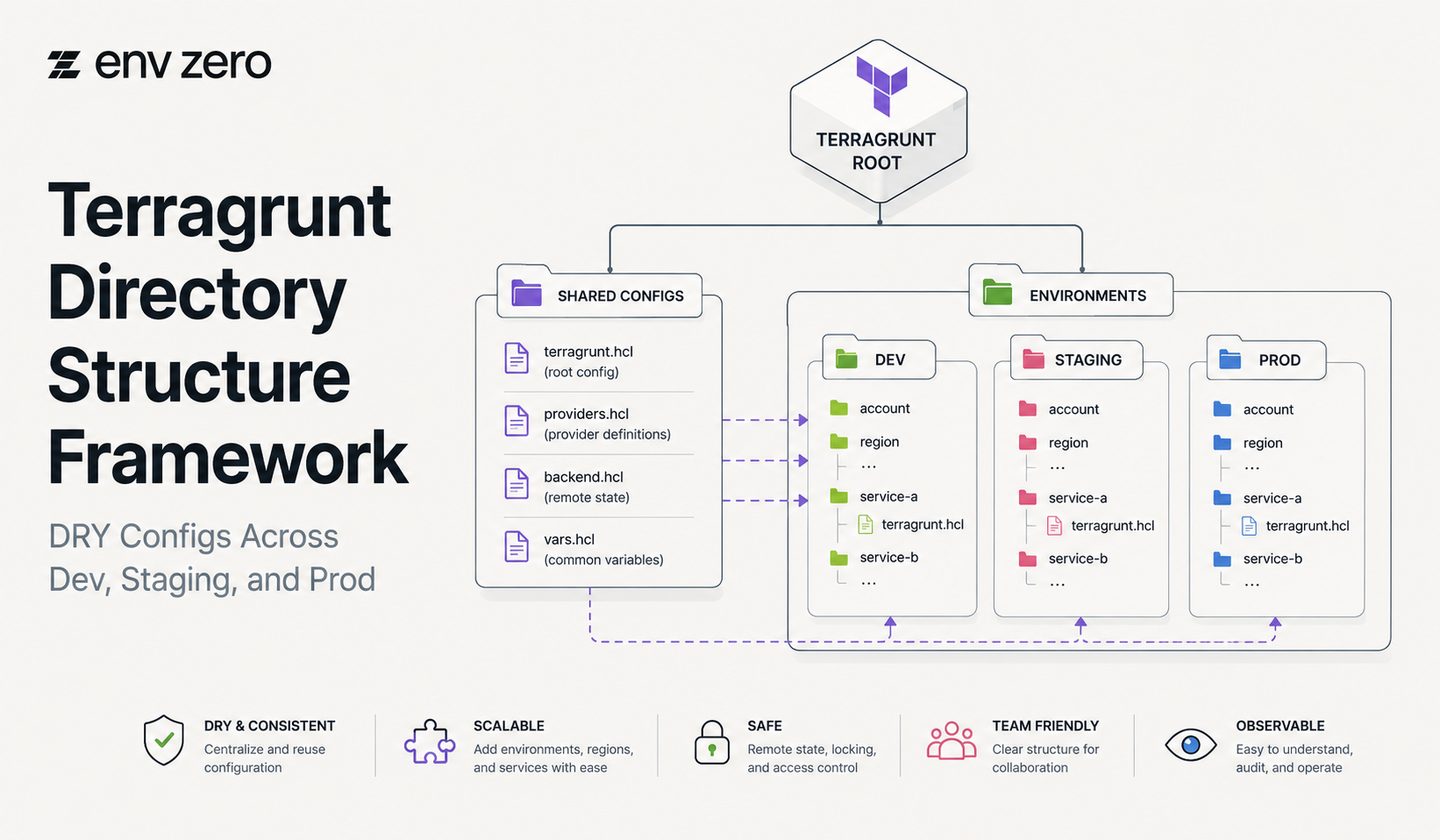
Many teams search for how to install Terragrunt, but installation is only the first step.
The bigger challenge is creating a Terragrunt directory structure that stays clean as infrastructure grows across dev, staging, and production.
Terragrunt is commonly used to reduce duplicated Terraform or OpenTofu configuration.
It helps teams keep backend settings, provider inputs, shared variables, and module references more maintainable.
But without a structure framework, Terragrunt repositories can become difficult to navigate.
Teams may copy folders between environments, create inconsistent overrides, or lose track of ownership.
This framework gives platform teams a practical way to structure Terragrunt for DRY configuration, environment separation, dependency clarity, and long-term governance.
It also explains where env0’s IaC Platform & Terraform Automation service helps teams manage Terragrunt workflows beyond repository structure.
Why Directory Structure Matters in Terragrunt
Terragrunt helps teams avoid repeated configuration, but it does not automatically create good architecture.
A poor directory structure can still create confusion, duplicated inputs, unclear dependencies, and risky production workflows.
A good Terragrunt structure should make it easy to answer basic questions.
Which environment owns this configuration? Which module is being called? Where are shared settings defined? Which team owns the unit? Which changes require approval?
If the folder structure cannot answer those questions, platform teams will eventually need manual documentation, tribal knowledge, and extra review.
That slows down delivery and makes Terragrunt harder to scale.
Start With a Live Infrastructure Repository
A common Terragrunt pattern is to separate reusable modules from live environment configuration. Modules define the reusable infrastructure. The live repository defines how those modules are used across accounts, regions, and environments.
For example, a simple live structure may look like this:
live/
dev/
app/
database/
network/
staging/
app/
database/
network/
prod/
app/
database/
network/
This structure is easy to understand because environments are visible at the top level. It also helps teams apply different approval rules for dev, staging, and production.
Keep Shared Configuration at the Right Level
Terragrunt becomes valuable when teams avoid repeating the same configuration in every unit. Shared settings should live at the highest level where they apply.
For example, remote state configuration may live near the repository root. Account-level settings may live inside an account folder.
Environment variables may live inside dev, staging, or prod. Component-specific values should live in the unit folder.
A practical pattern looks like this:
live/
root.hcl
dev/
env.hcl
app/terragrunt.hcl
staging/
env.hcl
app/terragrunt.hcl
prod/
env.hcl
app/terragrunt.hcl
The goal is simple: define common settings once and override only what changes. This keeps Terragrunt DRY without hiding important environmental differences.
Separate Environments Clearly
Dev, staging, and prod should not be mixed in the same folder without clear boundaries.
Each environment should have its own configuration path, state separation, and approval expectations.
Development environments usually need speed and flexibility. Staging should mirror production more closely.
Production should have the strongest controls, approvals, and audit requirements.
A clean Terragrunt directory structure supports this operating model. It allows platform teams to apply different governance rules based on environmental risk.
For example, dev changes may be self-service, while prod changes require approval through env0.
Organize by Component or Team
After environment separation, teams need to decide how to organize infrastructure inside each environment. Two common patterns are component-based and team-based.
A component-based structure groups infrastructure by function:
prod/
network/
database/
kubernetes/
app/
A team-based structure groups infrastructure by ownership:
prod/
platform/
payments/
data/
frontend/
Both patterns can work. Component-based structures are clearer for shared infrastructure.
Team-based structures are useful when product teams own their own infrastructure. The best choice depends on how your organization assigns ownership.
For enterprise teams, ownership should be explicit. Every Terragrunt unit should have a responsible team, review path, and lifecycle expectation.
Use Terragrunt Units Carefully
A Terragrunt unit is usually a deployable configuration with its own terragrunt.hcl. Units help teams isolate state, inputs, dependencies, and deployment workflows.
Units should be small enough to manage safely but not so small that every change requires coordinating dozens of folders.
A good unit often maps to a logical infrastructure component, such as a VPC, database, Kubernetes cluster, service account, or application environment.
When units are too large, plans become risky and hard to review.
When units are too small, dependencies become difficult to manage. Platform teams should define unit boundaries as part of their Terragrunt standards.
Use Stacks for Higher-Level Organization
Terragrunt stacks help teams organize related units into higher-level infrastructure groupings.
A stack may represent an application environment, shared platform layer, account baseline, or regional deployment.
Stacks become useful when teams want to manage a group of related units together without losing unit-level separation.
For example, a staging application stack may include networking references, application infrastructure, storage, and monitoring units.
The important rule is to keep stacks understandable. A stack should represent a meaningful operational boundary.
If a stack becomes a dumping ground for unrelated units, it will create more confusion than value.
Manage Dependencies With Visibility
Terragrunt dependency blocks allow one unit to reference outputs from another. This is useful, but dependency chains can become difficult to understand at scale.
Platform teams should document critical dependencies and avoid hidden chains where one unit depends on several others across environments or teams.
Dependencies should be easy to review before changes are applied.
A practical rule is to keep shared foundations, such as networking and identity, separate from application-level units.
This reduces the chance that an application change unexpectedly affects foundational infrastructure.
Avoid Common Directory Structure Mistakes
The most common mistake is copying full environment folders and then editing values manually.
This creates drift between environments and makes future updates harder.
Another mistake is placing too much logic in child folders. If every unit has unique backend settings, provider settings, and inputs, Terragrunt is no longer keeping the configuration DRY.
A third mistake is ignoring governance. A clean folder structure is helpful, but it does not replace approvals, RBAC, drift detection, cost visibility, or audit logs.
Where env0 Fits
env0 helps teams manage Terragrunt beyond repository structure.
With env0, platform teams can automate Terragrunt workflows, apply approval rules, control access with RBAC, detect drift, monitor cost, and maintain audit logs.
This matters because directory structure only solves part of the problem. Teams also need workflow governance.
Developers may need self-service access to dev environments, while production changes require stricter controls.
env0 gives platform teams a way to standardize Terragrunt workflows across teams, environments, and repositories without relying on scattered scripts or manual approvals.
Conclusion: Structure First, Governance Next
A strong Terragrunt directory structure keeps configuration DRY, separates environments clearly, defines ownership, and makes dependencies easier to understand.
But structure alone is not enough for enterprise IaC.
As Terragrunt usage grows, platform teams need governance around who can deploy, what requires approval, how drift is detected, and how changes are audited.
env0 helps teams combine clean Terragrunt structure with governed infrastructure delivery.
Build Governed Terragrunt Workflows With env0
env0’s IaC Platform & Terraform Automation service helps teams manage Terragrunt workflows with templates, approvals, RBAC, drift detection, cost visibility, and auditability.
Talk to env0 to standardize Terragrunt directory structures and build governed workflows across dev, staging, and production.
FAQs
What is the best Terragrunt directory structure?
The best Terragrunt directory structure separates reusable modules from live environment configuration. Most teams should clearly separate dev, staging, and prod, then organize units by component or team ownership.
Should Terragrunt environments be separate folders?
Yes, separate folders for dev, staging, and prod make ownership, state separation, and approval rules easier to manage. Production should usually have stricter workflow controls than development.
How does Terragrunt keep Terraform configuration DRY?
Terragrunt keeps configuration DRY by allowing shared settings, such as remote state, provider inputs, and common variables, to be defined once and inherited or reused across child configurations.
What are Terragrunt units?
Terragrunt units are deployable configurations, usually represented by individual terragrunt.hcl files. Each unit commonly maps to a logical infrastructure component, such as a network, database, cluster, or application environment.
What are Terragrunt stacks?
Terragrunt stacks group related units into higher-level infrastructure workflows. They help teams manage collections of infrastructure components while keeping individual units separated.
How does env0 help with Terragrunt?
env0 helps teams automate and govern Terragrunt workflows with approvals, RBAC, drift detection, cost visibility, templates, audit logs, and self-service controls across teams and environments.